Guides 13 min read
iOS privacy manifest (PrivacyInfo.xcprivacy) in 2026: required reason APIs, SDKs and ITMS-91053
A practical 2026 guide to the iOS privacy manifest: the four PrivacyInfo.xcprivacy keys, every required reason API code, third-party SDK manifests and signatures, the Xcode privacy report, and how to fix ITMS-91053 and the other upload emails.
Contents11 sections
An iOS privacy manifest is a property list named PrivacyInfo.xcprivacy that your app and each third-party SDK ship inside their bundle. It declares whether the code tracks users, which tracking domains it contacts, what data it collects, and why it calls “required reason” APIs: UserDefaults, file timestamps, system boot time, disk space and active keyboards. Since May 1, 2024, App Store Connect refuses builds whose code uses one of these APIs without an approved reason code, and the ITMS-91053 email is how it tells you. This guide covers every key, every reason code Apple lists today, a minimal manifest you can copy, and how the manifest relates to your App Store privacy labels.
Key takeaways
- The file must be named
PrivacyInfo.xcprivacyand be part of your target’s resources. Xcode creates it from the App Privacy file template. - It has four top-level keys:
NSPrivacyTracking,NSPrivacyTrackingDomains,NSPrivacyCollectedDataTypesandNSPrivacyAccessedAPITypes. - Required reason APIs fall into five categories, each with a short list of approved codes.
CA92.1(user defaults read and written only by your app) is the one almost every app needs. - Each SDK declares its own usage in its own manifest. Since February 12, 2025, the SDKs on Apple’s list of commonly used SDKs must ship one, plus a signature when they are binary dependencies.
- The upload emails to know: ITMS-91053 (missing reason), ITMS-91056 (invalid manifest) and ITMS-91061 (listed SDK without a manifest).
- Xcode’s privacy report combines every manifest in the archive, but you still fill in the App Privacy section of App Store Connect yourself.
What is an iOS privacy manifest?
Apple introduced privacy manifests at WWDC23. According to the privacy manifest documentation, the file records two things: the types of data the app or SDK collects (on every platform) and the required reason APIs it uses (on iOS, iPadOS, tvOS, visionOS and watchOS).
Each bundle carries its own manifest. On iOS, the app’s file sits at the root of the .app bundle and a framework’s at the root of the .framework; on macOS and Mac Catalyst it goes in Contents/Resources/. Your manifest describes your code only. A third-party SDK cannot rely on your manifest to cover its API usage, and your manifest should not list the SDK’s practices either.
Why does Apple care about APIs as mundane as UserDefaults or the system uptime? Because these values can be combined into a device fingerprint. Apple is explicit: regardless of whether a user grants tracking permission, fingerprinting is not allowed. By declaring a reason, you commit to using the API, and anything derived from it, only for that reason.
What Apple enforces in 2026
The rules arrived in stages. All of them are in force today:
| Date | What changed | Email you receive |
|---|---|---|
| June 2023 (WWDC23) | Privacy manifests and SDK signatures announced | — |
| March 13, 2024 | Apple starts emailing developers whose uploads use required reason APIs without reasons | ITMS-91053, as a warning |
| May 1, 2024 | Approved reasons required to upload; newly added listed SDKs need their manifest and signature | ITMS-91053, blocking |
| November 12, 2024 | Privacy manifests in a submission must be valid (no unexpected keys or values) | ITMS-91056 |
| February 12, 2025 | A new app, or an update that adds a listed SDK, must include that SDK’s manifest | ITMS-91061 |
As of October 2026, Apple’s documentation lists five required reason API categories. Apple says it reviews the list and the approved reasons from time to time, so check the required reason API page before each major release.
The four keys of PrivacyInfo.xcprivacy
| Key | Type | What it declares | When to include it |
|---|---|---|---|
NSPrivacyTracking | Boolean | Whether the app or SDK uses data for tracking, as defined by App Tracking Transparency | Always useful; false if you don’t track |
NSPrivacyTrackingDomains | Array of strings | Internet domains that engage in tracking | Only when NSPrivacyTracking is true |
NSPrivacyCollectedDataTypes | Array of dictionaries | Each data type collected, whether it is linked to the user, used for tracking, and why | When your own code collects data |
NSPrivacyAccessedAPITypes | Array of dictionaries | Each required reason API category used, with its reason codes | When your code calls any required reason API |
NSPrivacyTracking and NSPrivacyTrackingDomains
If you list tracking domains and the user has not granted permission through App Tracking Transparency, network requests to those domains fail. Apple’s technote TN3181 lists the combinations that make a manifest invalid: NSPrivacyTracking set to true with an empty domain list, or set to false with domains listed. Each domain is a host name only, with no path, no query and no trailing slash.
NSPrivacyCollectedDataTypes
Each entry is a dictionary with exactly four keys: NSPrivacyCollectedDataType (for example NSPrivacyCollectedDataTypeEmailAddress, NSPrivacyCollectedDataTypeHealth or NSPrivacyCollectedDataTypeCrashData), NSPrivacyCollectedDataTypeLinked, NSPrivacyCollectedDataTypeTracking and NSPrivacyCollectedDataTypePurposes. Purposes come from a fixed list: app functionality, analytics, product personalization, developer’s advertising, third-party advertising and other. Use only Apple’s values; Xcode cannot build a correct privacy report from custom ones.
“Collect” has a precise meaning in Apple’s App Privacy details: transmitting data off the device in a way that lets you or your partners access it for longer than needed to service the request in real time. Data processed only on the device is not collected.
Required reason APIs and their codes
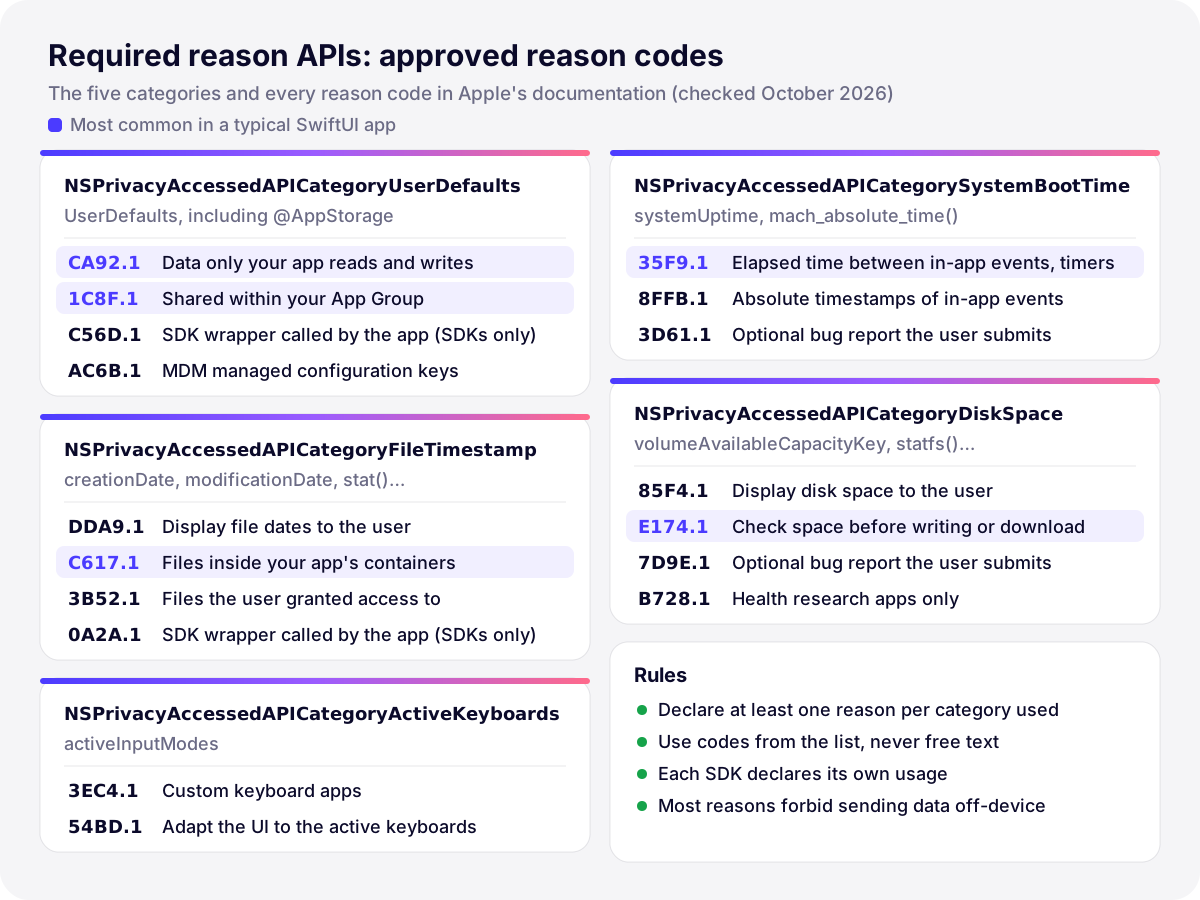
For each category your code uses, you add one dictionary to NSPrivacyAccessedAPITypes, containing the category string (NSPrivacyAccessedAPIType) and an array of one or more reason codes (NSPrivacyAccessedAPITypeReasons). Here is the complete list from Apple’s documentation:
Category (NSPrivacyAccessedAPIType) | Typical APIs | Approved reasons |
|---|---|---|
NSPrivacyAccessedAPICategoryUserDefaults | UserDefaults, so also @AppStorage, which is built on it | CA92.1, 1C8F.1, C56D.1 (SDKs only), AC6B.1 |
NSPrivacyAccessedAPICategoryFileTimestamp | creationDate, modificationDate, contentModificationDateKey, creationDateKey, stat, getattrlist… | DDA9.1, C617.1, 3B52.1, 0A2A.1 (SDKs only) |
NSPrivacyAccessedAPICategorySystemBootTime | ProcessInfo.systemUptime, mach_absolute_time() | 35F9.1, 8FFB.1, 3D61.1 |
NSPrivacyAccessedAPICategoryDiskSpace | volumeAvailableCapacityKey and its variants, volumeTotalCapacityKey, systemFreeSize, statfs… | 85F4.1, E174.1, 7D9E.1, B728.1 |
NSPrivacyAccessedAPICategoryActiveKeyboards | UITextInputMode.activeInputModes | 3EC4.1, 54BD.1 |
Picking the right reason
- Settings stored with
UserDefaultsor@AppStorage, read only by your app:CA92.1. - Values shared with a widget or extension through an App Group suite:
1C8F.1, alongsideCA92.1if you also use the standard defaults. - Reading dates or sizes of files in your own container, app group container or CloudKit container, for a cache cleanup for example:
C617.1. - Showing “last modified” dates to the user in a file list:
DDA9.1. Files the user picked with a document picker:3B52.1. - Checking free space before writing a large export or downloading content:
E174.1. The app must then behave differently in a way the user can observe. - Measuring elapsed time between events in the app, or running a timer, with
systemUptime:35F9.1.
Read the conditions, not just the titles. Most reasons forbid sending the information, or anything derived from it, off the device. C56D.1 and 0A2A.1 are reserved for SDKs that wrap the API for the app. If no reason matches a legitimate use, Apple offers a form to request a new one; otherwise, find another API.
How to create a privacy manifest in Xcode, step by step
- Choose File › New › File from Template (File › New File in older Xcode versions), scroll to the Resource section, select App Privacy and click Next.
- Check your app target in the Targets list, keep the default name
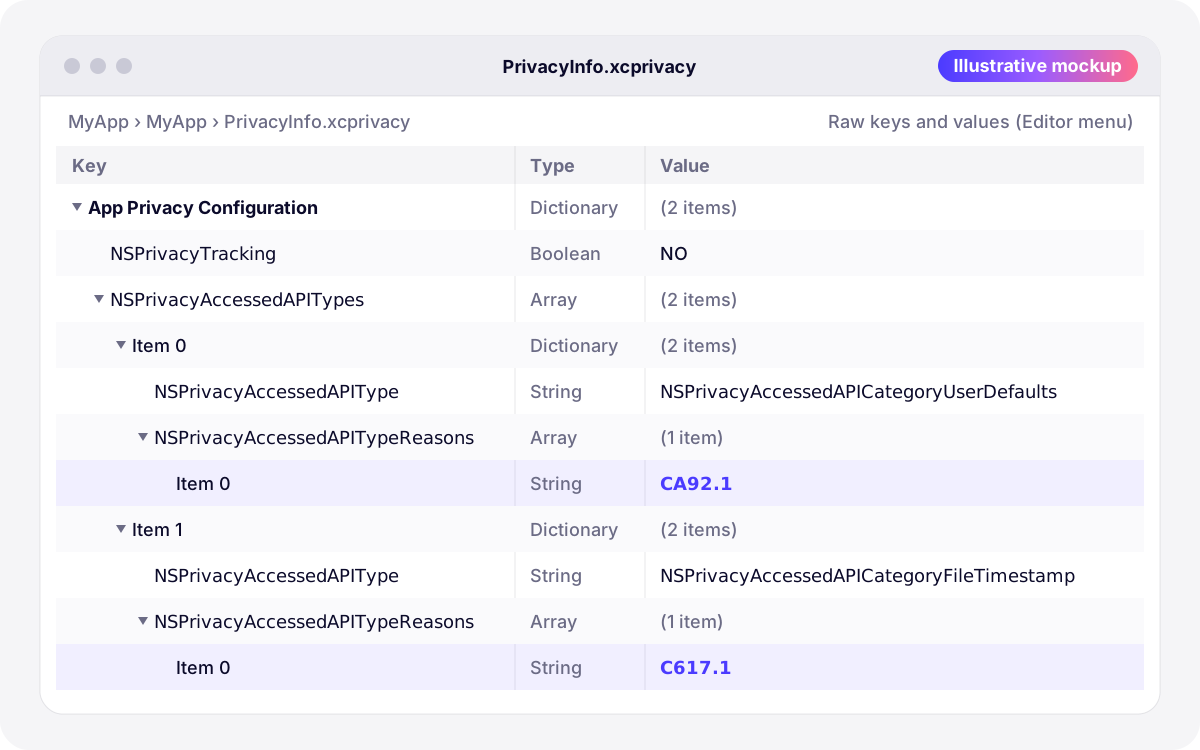
PrivacyInfo.xcprivacy(it is the required name) and click Create. Confirm the file appears in the target’s Copy Bundle Resources phase. - Open the file and choose Editor › Raw Keys and Values to see the real key names instead of their human-readable labels.
- Add
NSPrivacyTracking(Boolean). Set it to NO unless you track, in which case addNSPrivacyTrackingDomainstoo. - Add
NSPrivacyAccessedAPITypes(Array) with one dictionary per category your code uses, each containingNSPrivacyAccessedAPITypeandNSPrivacyAccessedAPITypeReasons. - If your own code collects data, add
NSPrivacyCollectedDataTypeswith one dictionary per data type. - Validate the file, archive, and generate the privacy report (see below).
Here is a minimal manifest for an app that does not track, stores its settings in UserDefaults and reads file dates inside its own container:
<?xml version="1.0" encoding="UTF-8"?>
<!DOCTYPE plist PUBLIC "-//Apple//DTD PLIST 1.0//EN" "http://www.apple.com/DTDs/PropertyList-1.0.dtd">
<plist version="1.0">
<dict>
  <key>NSPrivacyTracking</key>
  <false/>
  <key>NSPrivacyAccessedAPITypes</key>
  <array>
    <dict>
      <key>NSPrivacyAccessedAPIType</key>
      <string>NSPrivacyAccessedAPICategoryUserDefaults</string>
      <key>NSPrivacyAccessedAPITypeReasons</key>
      <array>
        <string>CA92.1</string>
      </array>
    </dict>
    <dict>
      <key>NSPrivacyAccessedAPIType</key>
      <string>NSPrivacyAccessedAPICategoryFileTimestamp</string>
      <key>NSPrivacyAccessedAPITypeReasons</key>
      <array>
        <string>C617.1</string>
      </array>
    </dict>
  </array>
</dict>
</plist>
If the app also sends an e-mail address to your server to create an account, add a collected data entry:
<key>NSPrivacyCollectedDataTypes</key>
<array>
  <dict>
    <key>NSPrivacyCollectedDataType</key>
    <string>NSPrivacyCollectedDataTypeEmailAddress</string>
    <key>NSPrivacyCollectedDataTypeLinked</key>
    <true/>
    <key>NSPrivacyCollectedDataTypeTracking</key>
    <false/>
    <key>NSPrivacyCollectedDataTypePurposes</key>
    <array>
      <string>NSPrivacyCollectedDataTypePurposeAppFunctionality</string>
    </array>
  </dict>
</array>
Before uploading, check the syntax in Terminal. plutil only proves the file is a well-formed property list; the keys and values are checked by App Store Connect.
plutil -lint PrivacyInfo.xcprivacySDK authors follow the same steps on their framework target. In a Swift package, place the file in the target’s sources folder and declare it explicitly, for example with resources: [.process("PrivacyInfo.xcprivacy")], because Xcode does not treat it as a resource by default. A plain static library (.a) cannot carry resources, so Apple recommends shipping a static framework instead.
Third-party SDKs: manifests and signatures
Apple maintains a list of SDKs that require a privacy manifest and signature. It includes networking and image libraries (Alamofire, AFNetworking, Kingfisher, SDWebImage), Firebase and Google modules (FirebaseCore, FirebaseCrashlytics, FirebaseMessaging, GoogleSignIn…), the Facebook SDK, OneSignal, RealmSwift, Lottie, SnapKit, the Flutter engine and many Flutter plugins, React Native’s Hermes, Capacitor, Cordova and UnityFramework. Any version of a listed SDK counts, as does any SDK that repackages one.
- The rule. When you submit a new app that includes a listed SDK, or an update that adds one, the SDK must contain its privacy manifest. Since February 12, 2025, a missing one triggers ITMS-91061: Missing privacy manifest.
- Signatures. When a listed SDK is a binary dependency (an XCFramework), it must be signed. Select the XCFramework in the Project navigator: the File inspector shows who signed it. If the signature later changes or disappears, the build fails with an error saying the framework “is not signed with the expected identity”. Only accept the change after checking with the vendor.
- The fix. Update to a version of the SDK that ships its manifest. Most maintainers added one in 2024, so an old pinned version is the usual culprit.
- Statically linked code. Apple’s rule is per bundle: if a static library without its own manifest is linked into your executable, its API calls are attributed to your app binary, and your app’s manifest has to cover them until the vendor ships a static framework with a manifest.
Fixing ITMS-91053 and the other upload emails
Xcode does not flag a missing reason when you build. App Store Connect analyzes the binary after upload, and if code references a required reason API with no declared reason, the build is not accepted and you receive an email titled “ITMS-91053: Missing API declaration”. It names the file whose code references the API and the categories involved, such as NSPrivacyAccessedAPICategoryUserDefaults.
| What it means | Fix | |
|---|---|---|
| ITMS-91053: Missing API declaration | Code in the named bundle calls a required reason API with no reason declared | Add the category and a valid reason to that bundle’s manifest, or update the SDK |
| ITMS-91055: Invalid API reason declaration | A reason is not a valid code for its category (free text such as “App Functionality”, for example) | Use a code from Apple’s list for that category |
| ITMS-91056: Invalid privacy manifest | Unexpected keys or values, or a malformed property list | Follow TN3181, run plutil -lint, update the SDK if the file is not yours |
| ITMS-91061: Missing privacy manifest | A listed SDK in the build has no manifest | Update the SDK, or replace it |
- Read the path in the email. If it points to your app’s executable, the fix belongs in your manifest. If it points inside
Frameworks/, it is an SDK’s job: update that SDK. - Find the calls in your code. A search from the project folder catches most of them:
grep -rnE "UserDefaults|AppStorage|systemUptime|mach_absolute_time|volumeAvailableCapacity|creationDate|modificationDate|activeInputModes" --include="*.swift" . - Pick the reason that matches each use (see the table above) and add the dictionary to
NSPrivacyAccessedAPITypes. - Increase the build number, archive and upload again. No metadata changes are needed in App Store Connect.
The privacy report and App Store privacy labels
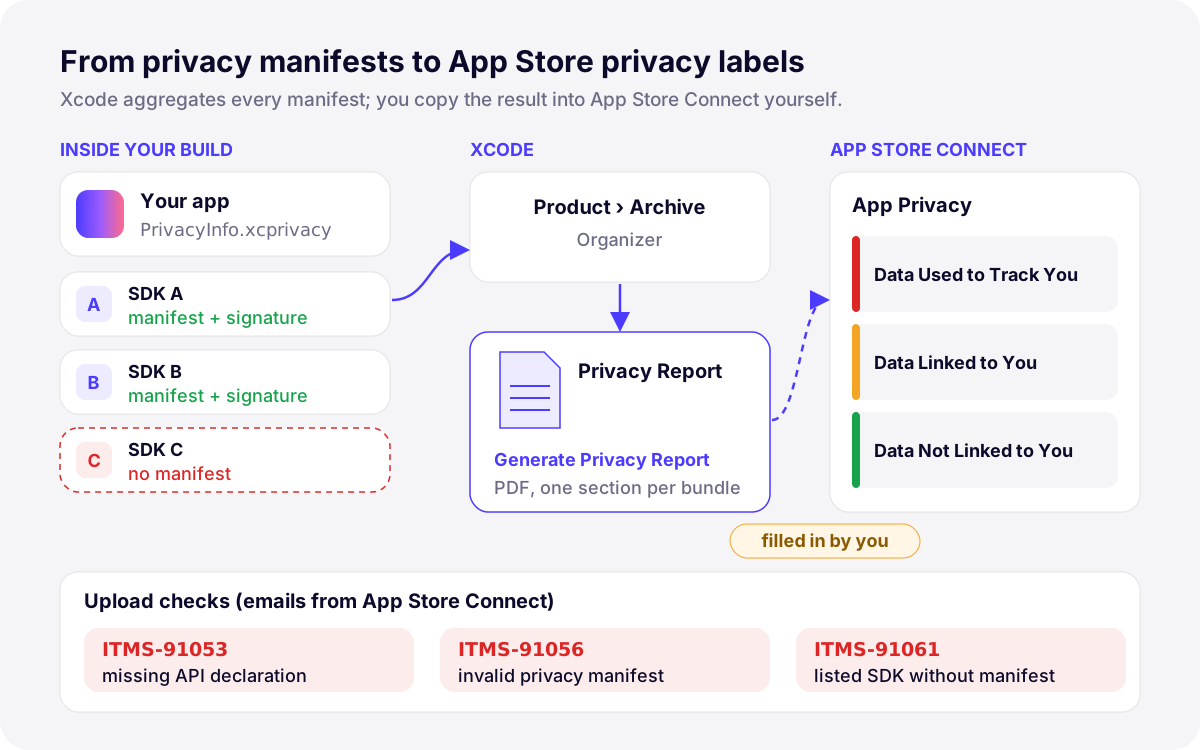
Xcode can combine the manifests of your app and of every SDK it links into one privacy report. To generate it:
- Choose Product › Archive. Xcode opens the archive in the Organizer.
- Control-click the archive and choose Generate Privacy Report.
- Save the report and open it in Preview: it is a PDF with a section for each bundle that has a manifest.
The report is organized like the Privacy Nutrition Labels, but it does not fill them in. The App Privacy section of App Store Connect remains a questionnaire you answer yourself, and it must cover the data your third-party partners collect, SDKs included. Use the report as a checklist: every data type it lists should appear in your answers and in your privacy policy, unless you can show it is never collected. Required reason APIs do not appear on the labels; they describe how the code uses certain APIs, not which data you collect. You can update your App Privacy answers at any time without submitting a new build.
A health example makes the split clear. An app like Pillio, which syncs medication logs with Apple Health, does not need a manifest entry for HealthKit: HealthKit is not a required reason API. What matters for the labels is whether health data leaves the device to reach you or a partner, which is Apple’s definition of collection. Guideline 5.1.3 adds that HealthKit data must not be used for advertising.
How Develak handles privacy manifests
Develak publishes more than 30 apps on the App Store, and the manifest is part of every submission in our App Store submission checklist. Before archiving, we search the code for required reason APIs, check that each SDK version ships its own manifest, then generate the privacy report and compare it with the App Privacy answers and the privacy policy. For a SwiftUI app without third-party SDKs, the manifest is often short: NSPrivacyTracking and one or two required reason entries. Apps that sell subscriptions have more to verify at review time; our guide to App Store subscription review covers it.
Apple adjusts these requirements regularly, and SDK updates can change what a build contains. Our iOS app maintenance service keeps manifests, SDK versions and privacy labels in step with each release, and our iOS app development service builds them in from the first version.
FAQ
Is a privacy manifest mandatory for every iOS app?
It is required as soon as your code uses a required reason API, which covers nearly every app since UserDefaults and @AppStorage are in the list. Listed third-party SDKs must ship their own. An app that uses none of these APIs and collects no data does not strictly need one, but adding a manifest with NSPrivacyTracking set to false costs little.
What does ITMS-91053: Missing API declaration mean?
App Store Connect found code in your build that calls a required reason API without an approved reason in the corresponding privacy manifest. The email names the file and the API categories. Add the category and a reason code to the manifest of the bundle in question, or update the SDK if the file belongs to one, then upload a new build.
Which reason code should I use for UserDefaults?
CA92.1 if the defaults are read and written only by your app. Use 1C8F.1 for values shared with your extensions, widgets or App Clips through an App Group. C56D.1 is only for SDKs that wrap UserDefaults for the app, and AC6B.1 is for MDM managed configuration keys.
Does the privacy manifest replace the App Store privacy labels?
No. The manifests feed Xcode’s privacy report, which helps you answer the App Privacy questions in App Store Connect, but nothing is copied over automatically. You remain responsible for labels that match what the app and its SDKs actually collect, and you can update them without a new build.
Do Mac apps need a privacy manifest?
Required reason API declarations apply to iOS, iPadOS, tvOS, visionOS and watchOS. Collected data types can be declared on every platform, including macOS, where the file goes in Contents/Resources/.
What if a third-party SDK has no privacy manifest?
Update to a version that includes one. If the SDK is on Apple’s list and still has no manifest, a new app or an update that adds it receives ITMS-91061, so replace the SDK or ask its vendor for a fixed release. Do not paste the SDK’s reasons into your own manifest unless its code is statically linked into your executable.
Building an iOS app?
Native Swift and SwiftUI, from the first sketch to the App Store and beyond.
Start a projectContents