
Xlocalize
Localize xcstrings
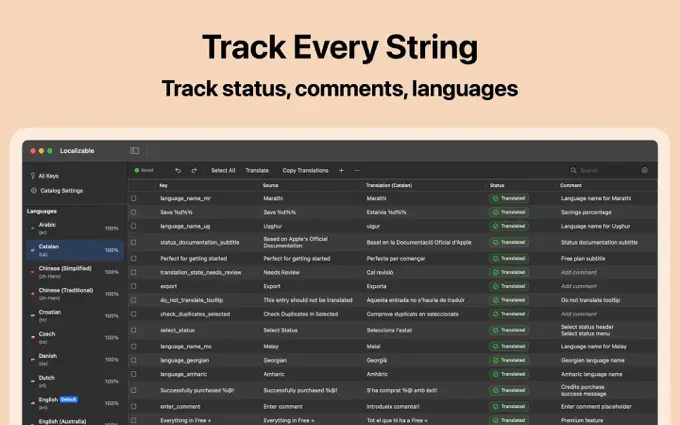
Our Mac app that translates String Catalogs
App localization
Develak localizes iOS apps end to end: String Catalogs, translated interfaces, localized App Store listings and screenshots, and testing in every language. Our own apps ship in up to 44 languages, and we built Xlocalize, a Mac app that translates .xcstrings files.
The service
Localization adapts an app to another language and region. It covers every string of the interface, but also plurals, dates, numbers, currencies and units, layouts that must stretch for longer words, and right-to-left scripts such as Arabic and Hebrew. Done well, users forget the app was ever written in another language.
The modern way to localize an iOS app is the String Catalog: a single .xcstrings file, introduced with Xcode 15, that holds every string, its translations and its plural variants. We set it up properly — extraction, comments for translators, variants — so each new release stays in sync across languages.
Localization also multiplies your reach on the App Store, where each locale has its own metadata and its own search results — see our App Store Optimization service. Our full method is explained in the guide How to localize an iOS app with String Catalogs.
What’s included
Everything that has to change when your app changes language.
We migrate or configure .xcstrings, extract every string and add context comments so translations are accurate.
Interface text translated and adapted for each market, with terminology kept consistent across the app.
Plural rules and number, date, currency and unit formats handled by the system, never by hand.
Screens tested for long words, large Dynamic Type sizes and right-to-left languages.
App name, subtitle, keywords, description and screenshot captions for each locale.
Every language reviewed in the running app, on a real device, before release.
String Catalog
All the text of your app lives in a String Catalog: every key, every language and every plural form, kept in sync by Xcode at each build.
English has two plural forms, Arabic six and Japanese one. The catalog stores each variant, so counts always read naturally.
Arabic and Hebrew mirror the whole interface. SwiftUI handles most of it; we check the rest on device.
Xcode flags new and changed strings, so a translation cannot silently go missing from an update.
Who it’s for
If people outside your home market could use your app, localization is often the most effective update you can ship.
Utilities, health, sports and hobby apps travel well: the need is universal, only the language changes.
New countries mean new search results and new users, without changing the product itself.
Your app grew and the strings got messy. We move you to String Catalogs and a clean workflow.
Deliverables
A localized app, localized listings, and a workflow that keeps them in sync.
Process
Groundwork once, then every language follows the same path.
We check how strings are defined, find hard-coded text and flag layouts that won’t survive longer languages.
You get: Localization audit
String Catalog set up, strings extracted, context comments written and plural variants defined.
You get: String Catalog
Interface and store metadata translated, then adapted to each market’s conventions and search terms.
You get: Translated UI & listing
Every language checked in the running app: truncation, plurals, formats and right-to-left layouts.
You get: QA in every language
Localized build and listings shipped together, with a process that keeps new strings translated.
You get: Localized release
Timeline
The first languages take the longest, because the groundwork happens once. As a guide:
Typical duration: A few days
Strings extracted and commented.
Typical duration: Days to a few weeks
Interface and store metadata.
Typical duration: A few days
Every language, every screen.
Typical duration: With your next update
App and listings together.
Guidance, not a guarantee: the number of languages and strings sets the real schedule.
Tools & frameworks
Apple’s native localization stack, plus a tool we built because we needed it ourselves.
Proof
Every Develak app is localized, most of them into dozens of languages — and we built our own translation tool for String Catalogs along the way.
FAQ
What developers and publishers ask us about localizing an iOS app.
Ask your question Not covered here? Write to us — we answer every message ourselves.
contact@develak.comTranslation converts text into another language. Localization adapts the whole experience: plurals, dates, currencies and units, layouts for longer words, right-to-left scripts, and the App Store listing and screenshots of each market.
String Catalogs are Apple’s localization format, introduced with Xcode 15. A single .xcstrings file stores every string of an app, its translations, its plural variants and comments for translators, replacing the older .strings and .stringsdict files.
Start with the markets where your category is popular and competitors are weak — usually a handful of major languages — then expand based on data. Develak’s own apps ship in up to 44 languages, but more is not always better for a first step.
Our workflow combines AI-assisted translation with human review. Xlocalize, our Mac app, translates String Catalogs with models such as Claude, GPT or Gemini, using translator comments as context; every language is then reviewed in the running app. For sensitive wording such as medical or legal text, we recommend a review by a native speaker and can work with your own translators.
Yes. Name, subtitle, keywords, description, promotional text and screenshot captions are localized for each locale. It is often the part with the highest return, because it opens up search results in every country.
Yes. We audit your project, move it to String Catalogs if needed, then handle translation and testing. Your team keeps a clean workflow for future releases.
Yes. SwiftUI mirrors layouts automatically for right-to-left languages such as Arabic and Hebrew; we then check every screen for icons, alignment and custom views that need attention.
Tell us which markets you have in mind. We’ll suggest where to start.