Guides 10 min read
Case study: Pillio, a medication reminder app built natively for iPhone
How Pillio, Develak’s medication reminder and dose log for iPhone and iPad, was shaped: flexible schedules, Apple Health and iCloud sync, Critical Alerts, accessibility, privacy without an account, and ten releases in public. Only verifiable facts from the App Store listing.
Contents10 sections
Pillio is Develak’s own medication reminder and dose log for iPhone and iPad: it reminds people to take medications and vitamins on any schedule, records every dose as taken, skipped or postponed, syncs with Apple Health and iCloud, and exports a PDF report for a doctor’s appointment. It was first released on May 19, 2025, reached version 1.6.1 on October 2, 2026 after ten releases, runs in 33 languages, and holds a 4.5-star average from 91 ratings on the US App Store (as of October 3, 2026). This case study sticks to what anyone can verify on the App Store listing and the app’s public pages.
Key takeaways
- Pillio solves one narrow, daily problem: remembering every dose, for yourself or for someone you care for, and keeping a history you can show a doctor.
- The product decisions are visible in the listing: flexible schedules, one-tap actions from the reminder, a dose timeline, PDF export, large text and dark mode for seniors and caregivers.
- It relies on native Apple technologies the listing names: Apple Health, iCloud sync, notifications including opt-in Critical Alerts, and App Store subscriptions.
- Privacy is structural: no account, data on the device and in the user’s private iCloud, and an App Privacy label that reads “Data Not Collected”.
- The public version history shows ten releases, seven of them between June and October 2026, most of them about reminder reliability.
How we wrote this case study
Develak publishes more than 30 of its own apps on the App Store, and Pillio is one of them. We could tell its story with internal dashboards, but you could not check any of it. So this case study uses only public sources: the App Store listing (description, version history, ratings, languages, App Privacy and accessibility labels), the Pillio page on this site and its privacy page. When a figure depends on the storefront or the date, we say which. You will find no download counts, revenue or invented timelines here.
A note on scope: Pillio is listed in the Medical category. It reminds, records and exports what the user enters; this article describes those features as the listing presents them and makes no claim about any medical or regulatory status.
The problem: every dose, every day, for one person or a whole family
Taking a medication on time sounds simple until the schedule gets real: a pill three times a day, a supplement every morning, a treatment every eight hours for ten days, a child’s vitamins, an older parent’s prescriptions. The listing names exactly these audiences:
- People on daily prescriptions, complex schedules or supplements.
- Parents managing their children’s vitamins or treatments.
- Family caregivers tracking medications for a loved one.
- Healthcare professionals who need accurate, timestamped records.
Two needs follow from that list. The reminder must arrive at the right time, every time, whatever the schedule. And the history must be trustworthy enough to answer the question a doctor or a caregiver will ask: was this dose taken, skipped or postponed, and when?
Product decisions you can see in the app
Schedules that match real treatments
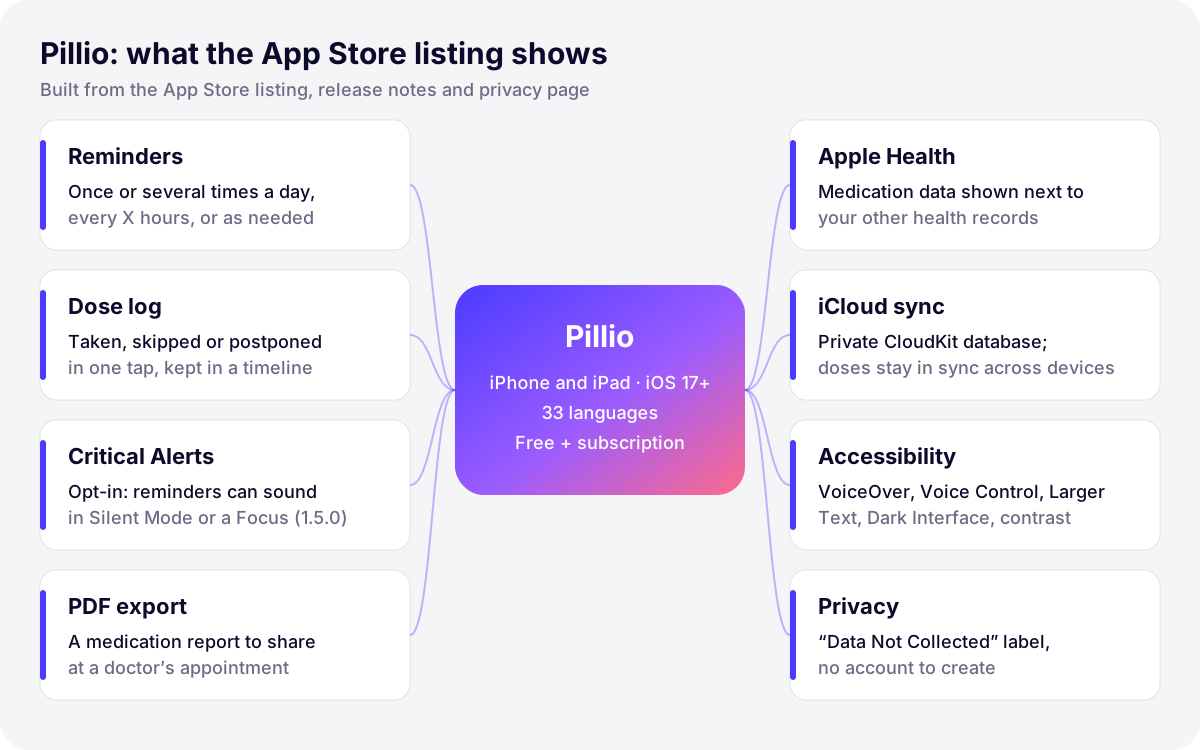
Each medication or vitamin gets a name, a dosage, a color and an icon, then a schedule: fixed times, once or several times a day, every X hours, or as needed. The release notes show that the edge cases matter as much as the common ones: version 1.6.1 fixed fixed-duration treatments such as “every 8 hours” ending one dose early, and made a treatment that starts later remind the user from its very first day.
One tap from the reminder
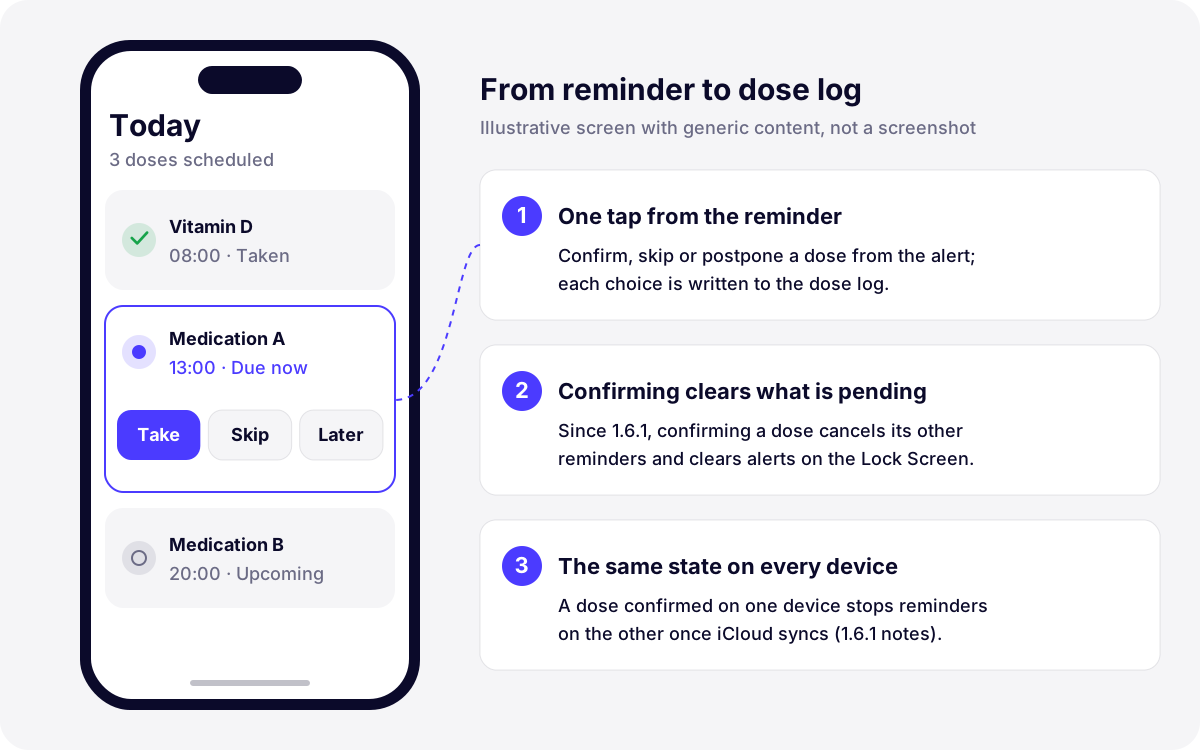
When a reminder arrives, the user confirms, skips or postpones the dose in a single tap, directly from the alert. Every choice lands in the Pill Log, a timeline of intakes, skips and postponements, with analytics on missed doses and progress over time. Version 1.6.0 added photo confirmation: confirming a dose asks for a photo of the medication, and missed-dose reminders keep insisting until the dose is confirmed.
A history you can hand to a doctor
The log is not only for the user. Pillio generates a PDF medication report designed for appointments and consultations. According to the app’s privacy page, exports such as PDF files are created on the device and the user decides where to send them. That choice keeps the most sensitive moment, sharing health information, under the user’s control.
Designed for caregivers and seniors
The listing describes a “caregiver and senior friendly” interface with large fonts, dark mode and iCloud sync. Version 1.4.0 turned that into a full accessibility pass: VoiceOver and Voice Control support, Dynamic Type for larger text, Dark Mode, improved color contrast and Reduce Motion. The App Store product page now shows seven declared accessibility features for Pillio: VoiceOver, Voice Control, Larger Text, Dark Interface, Differentiate Without Color Alone, Sufficient Contrast and Reduced Motion.
Privacy as an architecture, not a paragraph
Pillio’s privacy page states that the app asks for no account, keeps what the user enters on the device (encrypted by iOS data protection) and, if sync is on, in the private database of the user’s own iCloud account through Apple’s CloudKit. There is no Develak server collecting this data, no advertising and no third-party analytics or tracking SDK. The App Privacy label on the App Store reads “Data Not Collected”. For a medication app, this is the most important product decision of all, because it removes an entire category of risk instead of managing it.
Apple technologies the listing names
Pillio is a native iPhone and iPad app for iOS 17 or later. The listing, the release notes and the privacy page explicitly mention the following Apple technologies.
| Technology | What the public sources say | What it implies in a project |
|---|---|---|
| Apple Health (HealthKit) | “Apple Health Sync”: medication data alongside the user’s health records | Per-data-type permission, a clear purpose string, and strict rules on how health data may be used |
| iCloud (CloudKit) | iCloud sync; the private database of the user’s own iCloud account; a sync status screen since 1.6.0 | Sync without running a server, but conflict handling and cross-device state must be designed |
| Notifications | Reminders scheduled on the device; a test notification in Settings since 1.6.0 | Scheduling logic is the heart of the product and needs dedicated testing |
| Critical Alerts | Since 1.5.0, opt-in reminders that can sound in Silent Mode or during a Focus such as Do Not Disturb | Requires a special entitlement issued by Apple, requested in advance |
| App Store subscriptions | Monthly plan, and an annual plan with a 7-day free trial; transactions checked on the device | Paywall terms, restore purchases and App Review rules for subscriptions |
| Accessibility | VoiceOver, Voice Control, Dynamic Type, Dark Mode, contrast and Reduce Motion since 1.4.0 | Accessibility Nutrition Labels to declare on the App Store product page |
Two rows deserve a comment. Critical Alerts bypass the mute switch and Do Not Disturb, so Apple does not hand them out: as the UserNotifications documentation puts it, they require a special entitlement issued by Apple. In Pillio they are opt-in, and the user allows them when asked or in Settings. And accessibility is now part of the product page itself: Accessibility Nutrition Labels let developers declare which features their app supports, voluntarily for now, with Apple announcing they will eventually be required for new submissions. The subscription side follows the rules we detail in our guide to getting subscriptions through App Review.
What the version history shows
The App Store keeps a public version history. Pillio’s reads like a maintenance log, and its release notes are candid about what was wrong.
| Version | Date | Headline from the release notes |
|---|---|---|
| 1.0 | May 19, 2025 | First release |
| 1.1 | May 31, 2025 | General improvements |
| 1.2 | Aug 5, 2025 | Bug fixes and performance improvements |
| 1.3 | Jun 4, 2026 | Bug fixes, reliability and performance |
| 1.3.1 | Jun 14, 2026 | Runs on iOS 17 and later; annual-plan savings shown correctly in every language |
| 1.4.0 | Jun 17, 2026 | Accessibility pass; clearer dose-time setup; warning when notifications are off |
| 1.4.1 | Jun 26, 2026 | Daily reminders repeat dependably; more robust scheduling |
| 1.5.0 | Jul 15, 2026 | Critical Alerts, so reminders can sound in Silent Mode |
| 1.6.0 | Aug 10, 2026 | Root-cause fix for reminders that could stop being scheduled; test notification; photo confirmation; iCloud sync status |
| 1.6.1 | Oct 2, 2026 | Confirming a dose cancels all of its reminders, on every device once iCloud syncs |
Three patterns stand out. First, reliability is the recurring theme: versions 1.4.1, 1.6.0 and 1.6.1 are all about reminders arriving when they should, and not arriving when the dose is already taken. Second, reach was widened deliberately: 1.3.1 lowered the minimum to iOS 17 “so it runs on more iPhones”, and 1.4.0 opened the app to VoiceOver and Voice Control users. Third, the notes thank users for their feedback, which is a reminder that ratings and reviews are a support channel, not just a score.
Results, in public facts only
- Rating: 4.5 stars on average from 91 ratings on the US App Store, as of October 3, 2026. Ratings are per storefront: the French storefront shows no ratings yet on the same date.
- Languages: 33, from Arabic and Hebrew (right-to-left) to Japanese, Thai and Vietnamese.
- Release cadence: ten versions between May 19, 2025 and October 2, 2026, seven of them between June 4 and October 2, 2026.
- Privacy: App Privacy label “Data Not Collected”, no account required.
- Accessibility: seven accessibility features declared on the product page.
- Footprint: 5.8 MB, iPhone and iPad, iOS 17.0 or later, rated 4+.
We deliberately leave out downloads, conversion and revenue. They are not public, and a case study that asks you to trust numbers you cannot check is a brochure.
What this means for your project
If you are planning a health, reminder or habit app, Pillio’s public record carries lessons that apply directly to a client project:
- The core loop is the product. For a reminder app, notification scheduling, cross-device state and edge cases (an early dose, a treatment that starts tomorrow) deserve more design and test time than any screen.
- Request entitlements early. Critical Alerts, and any capability Apple grants case by case, belong in the plan from the first week, not the week before launch.
- Decide where data lives before writing code. On-device storage plus the user’s private iCloud means no server to secure and a simple, honest privacy label, as long as the design accepts that you will not see user data.
- Accessibility and localization are launch features. Caregivers and seniors are core users here, and 33 languages open the app far beyond its first market.
- Budget for the months after launch. Seven releases in four months is what keeping a reminder app trustworthy looked like in public.
This is the work our iOS app development service covers, from HealthKit and iCloud to subscriptions and App Review. And because the story continues after version 1.0, our app maintenance service takes over the releases, iOS updates and reliability fixes that keep users’ trust. If you have a project like Pillio in mind, tell us about it.
More case studies
- ApexLap: a lap timer and telemetry app designed for track days, gloves and full sun.
- Xlocalize: a Mac app that translates Xcode String Catalogs with AI.
FAQ
What is Pillio?
Pillio is an iPhone and iPad app published by Develak that reminds you to take medications and vitamins, logs every dose as taken, skipped or postponed, syncs with Apple Health and iCloud, and exports PDF reports for doctor visits. It is free to download, with optional monthly or annual subscriptions.
Where do the figures in this case study come from?
Only from public sources: the App Store listing and its version history, the ratings shown on the US and French storefronts on October 3, 2026, and the Pillio page and privacy page on develak.com. We do not publish internal metrics such as downloads or revenue.
Can any app use Critical Alerts?
No. Critical Alerts play a sound even when the device is muted or in Do Not Disturb, so Apple requires a special entitlement that it issues on request. Plan the request early in a project and design the feature as opt-in, as Pillio does.
Does a health app need its own server?
Not necessarily. Pillio keeps data on the device and, with sync on, in the user’s private iCloud database through CloudKit, so there is no Develak server holding health data. A server becomes necessary when you need shared accounts, web access or data that a care team reads, and that choice changes your privacy and compliance work.
Can Develak build an app like Pillio for my company?
Yes. We design and build native iPhone, iPad and Mac apps for founders and companies with the same tools and standards we use for our own apps, then maintain them after launch. Start with our iOS development service page and send us your project.
Building an iOS app?
Native Swift and SwiftUI, from the first sketch to the App Store and beyond.
Start a projectContents