Guides 13 min read
App Store guideline 4.2 and 4.3 rejections: minimum functionality and spam, explained (2026)
What App Store guidelines 4.2 (Minimum Functionality) and 4.3 (Spam) actually say, why web wrappers, thin apps, templates and look-alike apps get rejected, where widgets and Live Activities fit, and how to reply to App Review or appeal.
Contents10 sections
Guideline 4.2 (Minimum Functionality) rejects apps that don’t do enough on their own: repackaged websites, collections of links, thin single-purpose screens and apps generated from a commercial template. Guideline 4.3 (Spam) rejects apps that duplicate each other, such as one app published under several bundle IDs, or that add nothing to a category the App Store already has plenty of. To get through, give the app native value that works without your website, make its purpose distinct from every other app (yours included), and explain that difference to App Review in a short, factual reply before you consider an appeal.
Key takeaways
- 4.2 is about the app itself: it must be more than a website, a catalog of links or a single trivial action, and it must offer lasting value.
- 4.3 is about the app compared with others: no duplicate bundle IDs of the same app, and no near-copies of what is already widely available.
- Widgets, Live Activities and App Clips extend an app; the guidelines expect them to relate to the app’s content, so the main app still has to stand on its own.
- Template and app-generator output (4.2.6) must be submitted by the content provider, or combined into a single “picker” app.
- Reply in the App Review section of App Store Connect first (up to 4,000 characters, attachments allowed); appeal to the App Review Board only if you believe the app was misunderstood.
- A portfolio of niche apps is fine when each app solves a different problem; variants of one app belong inside one app.
What guidelines 4.2 and 4.3 actually say
Both rules sit in section 4, Design, of the App Store Review Guidelines (the version quoted here was last updated on June 8, 2026). Rejection messages cite them by number, sometimes with a sub-point, so it pays to know exactly what each one covers.
Guideline 4.2: Minimum Functionality
The main text of 4.2 asks for features, content and UI that “elevate it beyond a repackaged website”. It adds that an app that is not “particularly useful, unique, or app-like” doesn’t belong on the App Store, and that apps without lasting entertainment value or adequate utility may not be accepted. The sub-points narrow it down:
| Sub-point | What it covers |
|---|---|
| 4.2.1 | ARKit apps need rich, integrated AR; dropping a model into an AR view or replaying an animation is not enough. |
| 4.2.2 | Other than catalogs, apps shouldn’t primarily be marketing materials, ads, web clippings, content aggregators or a collection of links. |
| 4.2.3 | (i) The app works on its own, without requiring another app to be installed. (ii) If it must download extra resources at first launch, it discloses the size and asks first. |
| 4.2.4 and 4.2.5 | Listed as “Intentionally omitted” in the current guidelines. |
| 4.2.6 | Apps made from a commercialized template or app generation service are rejected unless submitted directly by the provider of the app’s content. |
| 4.2.7 | Rules for remote desktop clients: user-owned host on a local network, software executed on the host, no store-like interface, and no thin clients for cloud apps. |
Guideline 4.3: Spam
Guideline 4.3 has two parts:
- 4.3(a), duplicates. “Don’t create multiple Bundle IDs of the same app.” Apple’s example is a separate map app for every city instead of one worldwide map. Variations for locations, sports teams or universities should live in a single app, unlocked with options or in-app purchase.
- 4.3(b), saturated categories. Don’t submit apps that are indistinguishable from what is already widely available. Apple names dating, flashlight, sound effects, wallpaper, simple timer and fortune-telling apps as well-established categories where new submissions need a “meaningfully different or improved experience”, and warns that repeated low-effort submissions may lead to removal from the Apple Developer Program.
Apple’s App Review page lists both among common issues. Under “Not enough lasting value”, it warns that an app that doesn’t offer much functionality or content, “or only applies to a small niche market”, may not be approved. Under “Repeated submission of similar apps”, it suggests combining near-identical apps into one.
Why apps get rejected under 4.2
Reviewers judge what they see in the build, on a device. The patterns behind a minimum functionality rejection are consistent:
- Web wrappers. A
WKWebViewloading your site, with a tab bar on top, is the textbook case. Apple’s App Review page says that websites served in an app, web content not formatted for iOS and limited web interactions “do not make a quality app”. Using web technology is not the problem in itself; an app that only mirrors a website is. - Marketing and link apps (4.2.2). A brochure for a business, a list of links, an RSS reader for one blog, a page of contact buttons.
- Thin utilities. One screen, one action, nothing saved, nothing to come back to: a single converter, a counter, a static reference sheet. The more basic the job, the more the rest of the app has to carry.
- Template and generator output (4.2.6). Agencies and app builders that publish one app per client from the same template, under their own account. Apple’s alternatives: the client submits under its own account, or the provider ships one aggregated app with an entry per client.
- Apps that depend on another app (4.2.3). A companion that does nothing until a separate app is installed.
- Incomplete first impressions. Empty screens with no sample content, or features behind a login with no demo account, make an app look thinner than it is.
Live Activities, widgets and App Clips: can an app be just that?
Searches such as “live activity guideline 4.2” come from developers whose app is mostly a Live Activity or a widget, with a main screen that only has a start button. The guidelines contain no rule that names Live Activities in 4.2, so here is what Apple actually documents:
- Guideline 2.5.16: widgets, extensions and notifications “should be related to the content and functionality of your app”. They are extensions of an app, not substitutes for one.
- Live Activities are built with ActivityKit inside a widget extension. The Human Interface Guidelines reserve them for tasks and events with a defined beginning and end, and ActivityKit ends them after eight hours at most (they can stay on the Lock Screen for up to four more). They must not show ads or promotions, and guideline 4.5.3 forbids using them to spam users.
- Widgets show glanceable, periodically refreshed content and should deep-link into relevant parts of the app; the HIG notes that replicating an app icon adds little value.
- App Clips are a lightweight part of a full app, for a quick task or a demo; they ship with the app, not instead of it.
Our reading, which is ours and not an Apple statement: a reviewer opens the main app first, so if the only thing it does is start a Live Activity or host a widget, 4.2 is a likely outcome. The fix is to give the app a reason to be opened: history of past sessions, settings that change what the Live Activity tracks, statistics, a timeline, data export. The Live Activity or widget then becomes the convenient surface of a real app.
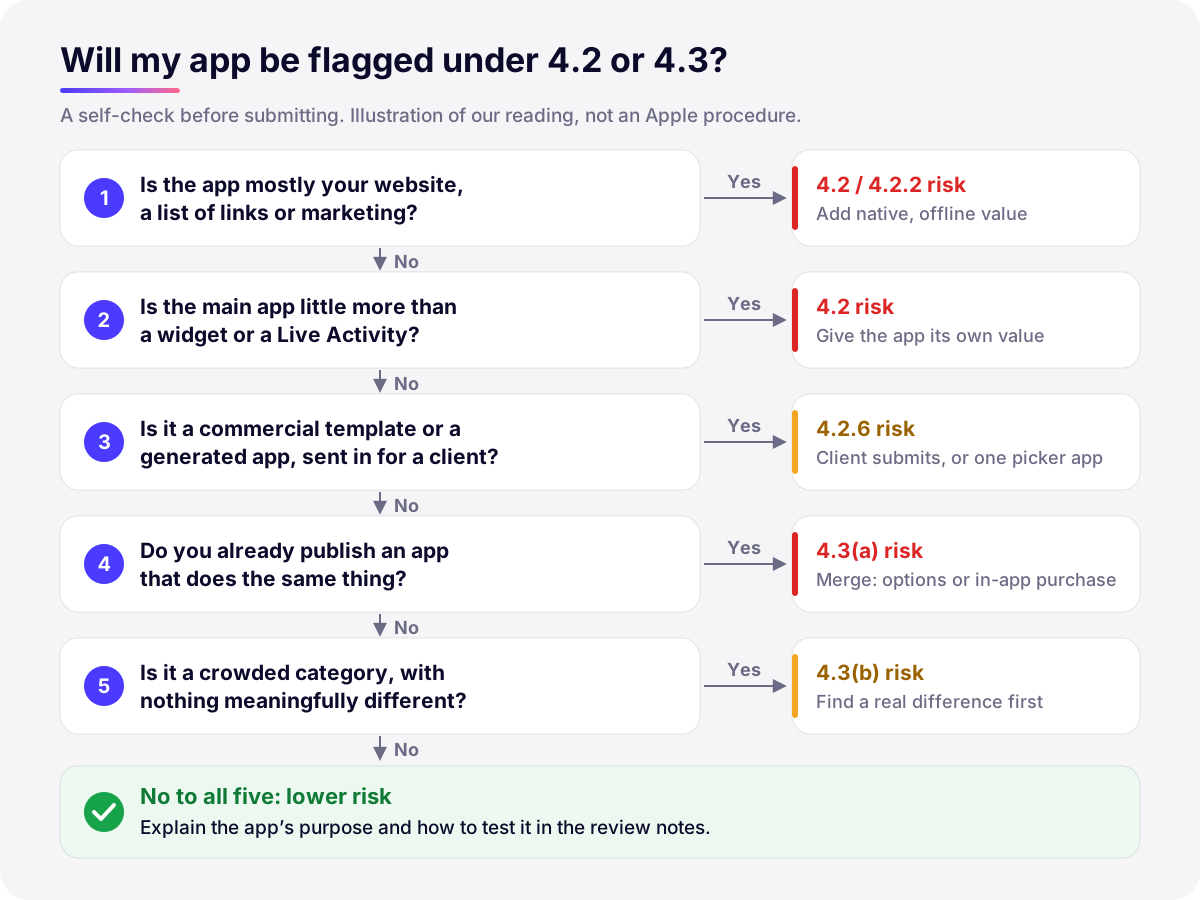
Why apps get flagged as spam under 4.3
A 4.3 rejection is rarely about one app in isolation. It compares the submission with the rest of the store and, for duplicates, with the other apps you submit:
- One app, several names. The same binary with a different theme, city, language or target audience, each under its own bundle ID. This is exactly the 4.3(a) example.
- Reskinned templates. Purchased source code or a generic template republished with new colors and an icon; the screens, flows and descriptions stay recognizable.
- Crowded categories with nothing new. Another flashlight, wallpaper or simple timer app, with the same feature set as hundreds of others (4.3(b)).
- Look-alike metadata. Several apps from one account with near-identical screenshots, descriptions and keywords make even different apps look like duplicates.
Close cousins to keep apart: copying someone else’s app or its name and UI falls under 4.1 (Copycats), and keyword stuffing under 2.3 (Accurate Metadata). The App Store submission checklist covers those and the other common rejections.
How to make an app pass 4.2
Minimum functionality is not a feature count. The question behind it is: would someone open this app again next week, and could it exist as a website just as well? These changes move an app in the right direction:
| Weak signal | Stronger signal |
|---|---|
| Everything loads from your website | Core screens are native and work offline, with local data (SwiftData, Core Data or files) and iCloud sync where it helps |
| One action, nothing kept | History, search, statistics, reminders: reasons to come back |
| Widget or Live Activity is the whole product | The app holds the data and settings; the widget or Live Activity is a shortcut to it |
| Generic UI with placeholders | Platform conventions, Dynamic Type, dark mode, sample content on first launch |
| No device integration | Features that fit the purpose: notifications, App Intents and Shortcuts, HealthKit, camera, Apple Watch |
| Login wall with no demo | Demo account or demo mode, and review notes explaining what to try |
Add integrations because they serve the purpose, not as decoration: a reviewer will not be impressed by a widget that only repeats the app icon. If your product is web-first, decide early whether a native app is justified at all; our comparison of SwiftUI, Flutter and React Native helps when choosing how to build it. And test the exact build App Review will see, from a clean install, through TestFlight: external testing also goes through a beta review.
For a first version, scope matters more than polish. An MVP should be the smallest app that still delivers lasting value on its own, not a shell that promises features for later.
How a studio publishing many niche apps keeps each one distinct
Develak publishes more than 30 apps on the App Store, most of them for a specific niche, so 4.3 is a rule we think about before writing any code. Sharing an architecture, a design system and components across apps is normal engineering and not what 4.3 targets. What matters is that each app answers a different need. Two sports apps from our catalogue show the idea: TenRing records archery scores and plots arrows, Cragly logs climbing sessions and stats. Same studio, different users, different data and screens.
The rules we apply before starting a new app:
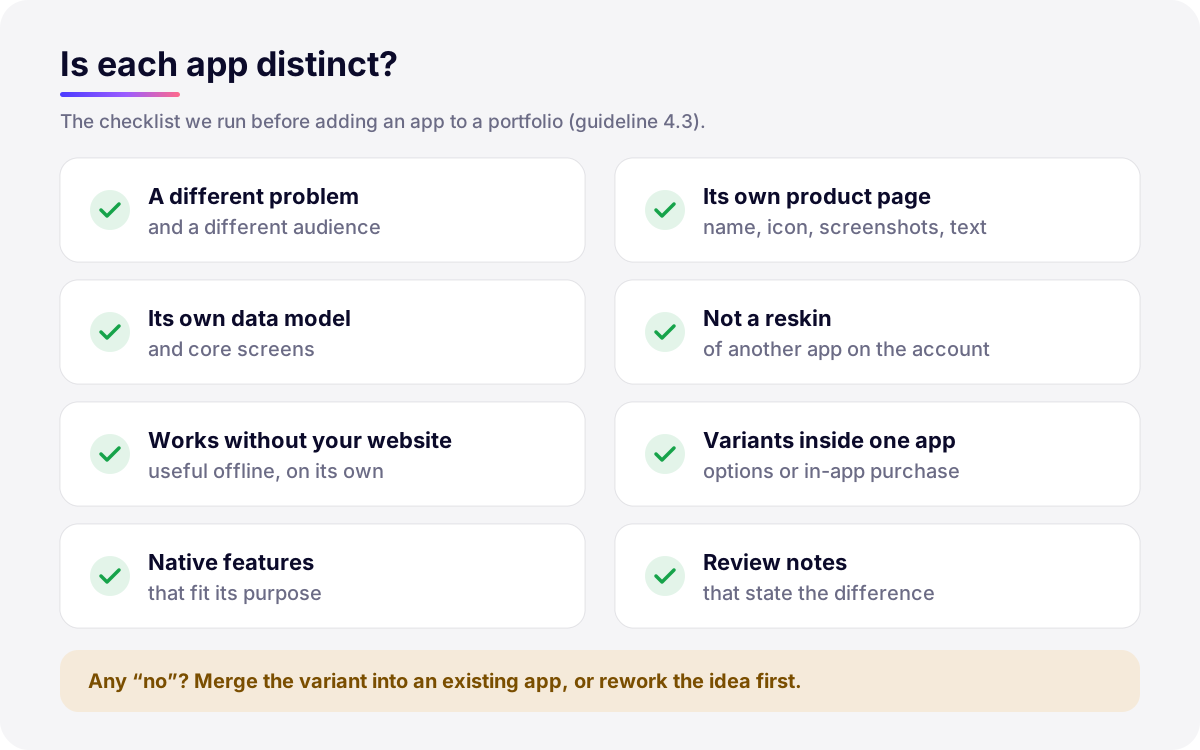
- One problem per app. If two ideas differ only by audience, region or theme, they are one app with options, not two apps.
- A data model of its own. If the core entities and main screens are the same as another app’s, the purpose probably is too.
- Native value that fits the niche. The features a user of that niche would expect, working offline.
- Its own product page. Name, icon, subtitle, screenshots and description written for that app, not adapted from a sibling. Distinct metadata is also better App Store Optimization.
- Review notes that state the difference. One or two sentences on who the app is for and what it does that others don’t.
How to reply in App Review (the former Resolution Center)
Rejection messages arrive in the App Review section of the app’s page in App Store Connect, long known as the Resolution Center. According to App Store Connect Help, you open the unresolved issue, click Resolve, then Reply to App Review; the reply holds up to 4,000 characters and you can attach files such as screenshots or documents. The Account Holder, Admin and App Manager roles can reply. If the rejection was only about metadata, you can resubmit the same build once it’s fixed.
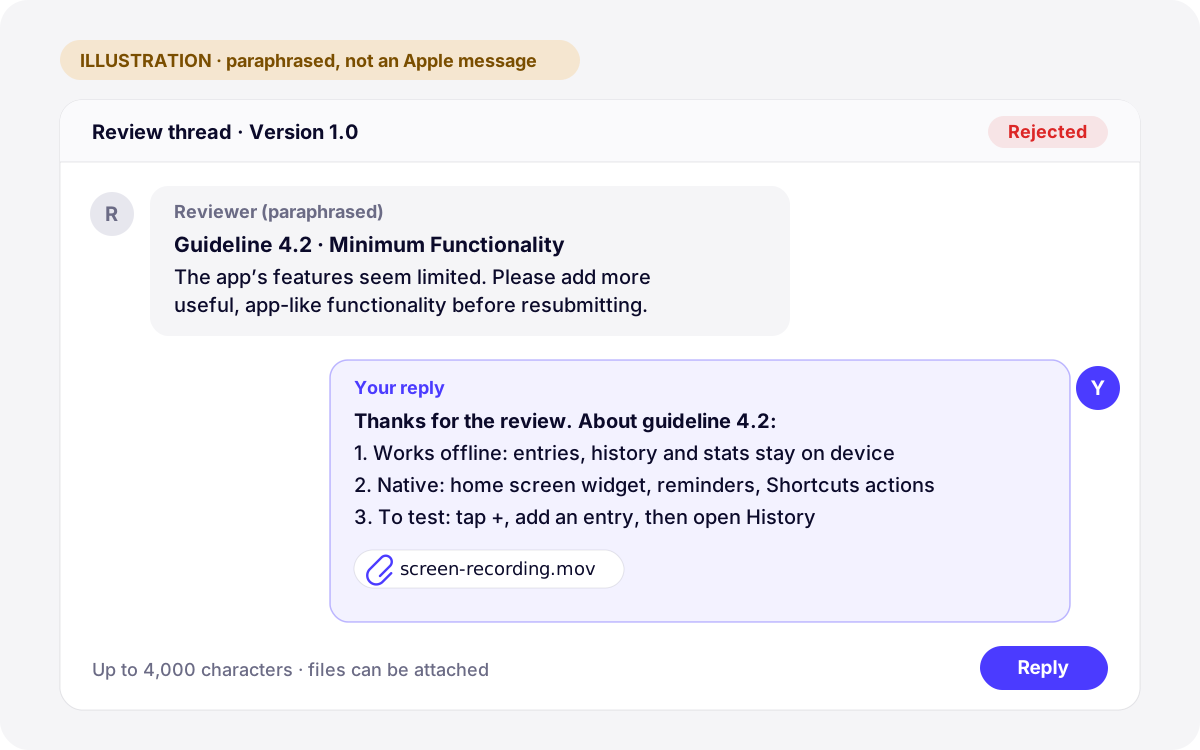
A good reply to a 4.2 or 4.3 rejection is short and verifiable:
- Thank the reviewer and restate the guideline cited, so the thread stays on one topic.
- Describe what the app does that a website or a sibling app doesn’t, in three or four concrete points.
- Give exact steps to reach those features, plus a demo account if needed, and attach a short screen recording.
- If you changed the app, say what changed and in which build number.
- Stay factual. Comparisons with other approved apps rarely help; each app is reviewed on its own.
One special case: if an update to an app already on the store was submitted as a bug fix, the guidelines say bug fixes won’t be delayed over guideline violations, except legal or safety issues. Tell App Review in the thread that you want to use this process and will address the issue in your next submission.
When to appeal to the App Review Board
An appeal goes to the App Review Board through Apple’s appeal form, not through the message thread. Apple’s App Review page frames it for cases where you feel the reviewer misunderstood the app’s concept and functionality, or that you were treated unfairly. It asks you to give specific reasons why the app complies, to submit only one appeal per rejected submission, and to answer any pending request for information first.
- Appeal when the reviewer missed features that exist (behind onboarding, a login or a setting), or treated a genuinely different app as a duplicate, and your reply in the thread didn’t resolve it.
- Don’t appeal when the app really is a wrapper, a reskin or a variant of another app on your account. Fix the product instead: add native value, or merge the variants into one app.
- Ask for advice before a big change: Apple offers 30-minute App Review appointments over Webex to discuss the guidelines.
Resubmitting the same build under a new name is not a strategy. The guidelines say an app repeatedly rejected for the same violation takes longer to review, and 4.3(b) warns that repeated low-effort submissions can cost the developer account.
How Develak handles 4.2 and 4.3
For our own apps and for clients, we check 4.2 and 4.3 at the idea stage, not after a rejection: does the app work offline, does it do something a website can’t, and is it distinct from everything else on the account? Before submission we write review notes that explain the app’s purpose and how to test it. Nobody can guarantee approval, since only Apple decides, but this removes the avoidable surprises. If you are planning an app, our iOS app development service covers the build and the exchange with App Review, or tell us about your project.
FAQ
What does “Guideline 4.2 – Design – Minimum Functionality” mean?
It means the reviewer found that the app doesn’t offer enough features, content or app-like value on its own: typically a repackaged website, a collection of links, marketing material or a very thin utility. The fix is to add native functionality with lasting value, then explain it in your reply, with steps and a screen recording.
Can an app consist only of a Live Activity or a widget?
No guideline names Live Activities in 4.2, but they and widgets are extensions that guideline 2.5.16 expects to relate to the app’s content and functionality. A main app whose only job is to start a Live Activity is likely to be judged too thin. Give the app its own value, such as history, settings and statistics, and let the Live Activity or widget surface it.
Is every app that uses a web view rejected?
No. Many approved apps show some web content. The problem is an app that is mostly a website: same content, same navigation, little or nothing native. If the core experience works offline and uses the platform, a web view for secondary pages such as help or terms is not an issue.
Can I publish several similar apps from one developer account?
Several apps, yes; several versions of the same app, no. Guideline 4.3(a) asks you not to create multiple bundle IDs of the same app and to handle variations for locations, teams or audiences inside one app, for example with in-app purchase. Apps with different purposes, data and audiences can share code and design without breaking the rule.
Should I reply, resubmit or appeal after a 4.2 or 4.3 rejection?
Reply first, in the App Review section of App Store Connect, if the reviewer missed something. Resubmit with a new build if the criticism is fair and you’ve changed the app. Appeal to the App Review Board only if you still believe the app was misunderstood, with specific reasons, and only once per rejected submission.
Building an iOS app?
Native Swift and SwiftUI, from the first sketch to the App Store and beyond.
Start a projectContents