

Xlocalize
Localize xcstrings
Developer Tools
App Sales Dashboard
See every app’s sales, subscriptions, and reviews in one Mac dashboard
Appviary is a Mac app by Develak that brings all your App Store Connect data — sales, downloads, subscriptions, and reviews — into one portfolio dashboard for indie developers and app studios.
Screenshots

Overview
Appviary is a native Mac app that brings together everything App Store Connect shows you app by app, so you can see your whole portfolio at once. Sales, downloads, proceeds, subscriptions, and reviews sit side by side for every app you ship, from today’s numbers to any custom range.
Built for developers and studios who manage more than one app, or more than one App Store Connect account, Appviary adds live numbers in the menu bar, desktop widgets, and keyboard shortcuts, plus CSV export and smart alerts for sales spikes, drops, and new 1-2-star reviews.
Appviary is the cross-app portfolio dashboard Apple removed — built natively for Mac.
Connect your App Store Connect API key (stored in your Mac’s Keychain, never on a server) and see every app you ship in one birds-eye view: sales, downloads, proceeds, subscriptions and reviews, all together.
Requires macOS 14 or later. Universal (Apple silicon + Intel).
Terms of Use (EULA): https://www.apple.com/legal/internet-services/itunes/dev/stdeula/
Privacy Policy: https://develak.com/privacy-policy/
Highlights
Appviary is a Mac app that turns your App Store Connect data into one dashboard for sales, subscriptions, reviews, and revenue across all your apps.
See every app you ship stacked side by side, with sales, downloads, and proceeds for today, 7 days, 30 days, or any range you pick.
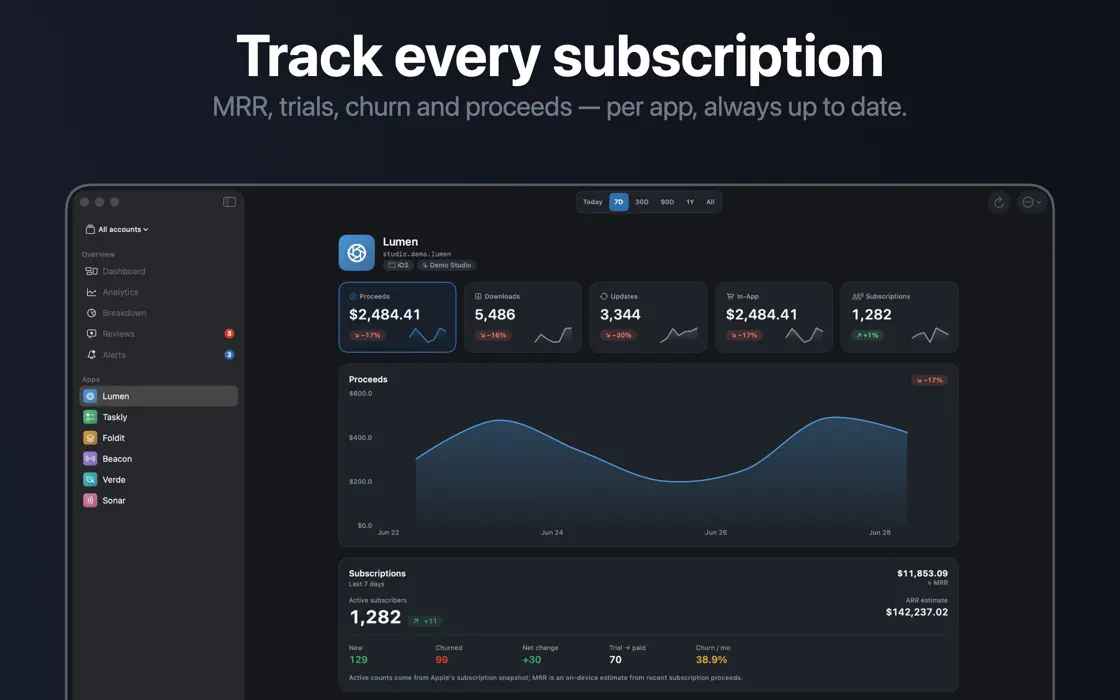
Track active subscribers, MRR, trials, conversion, churn, and retention broken down by app, country, product, and billing period.
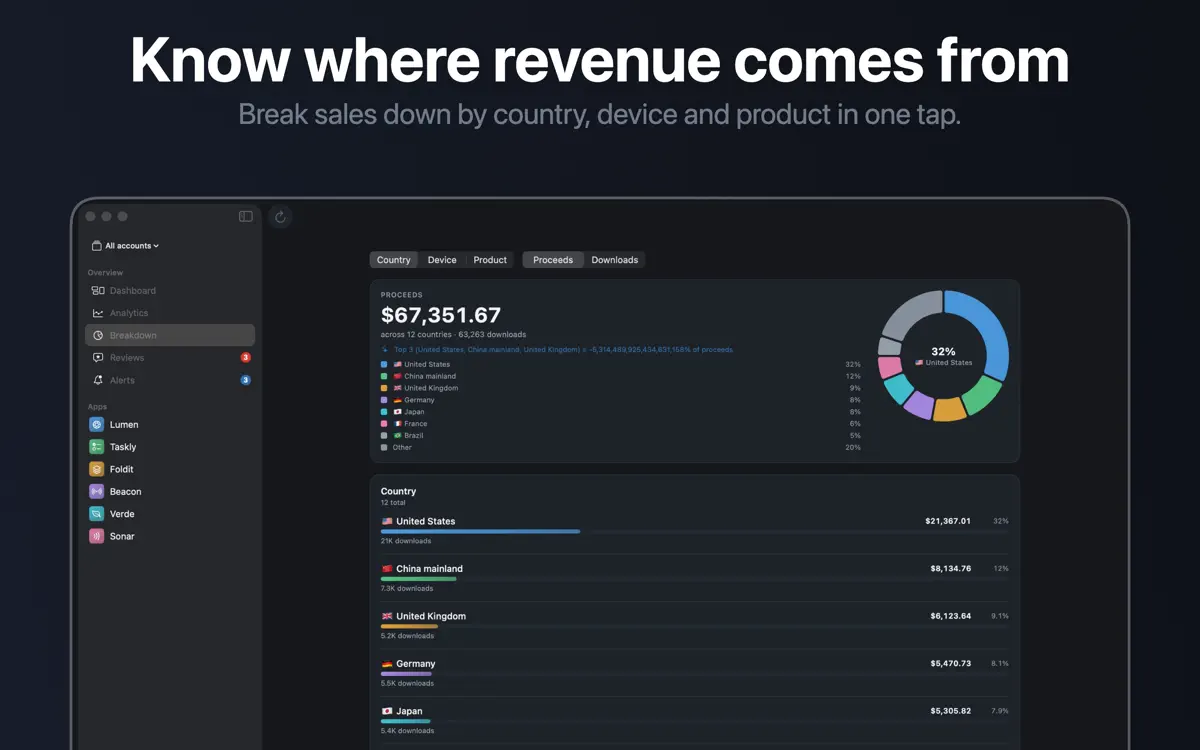
Split sales by country, device, and product SKU, and correlate any two metrics across your whole catalog to see what drives growth.
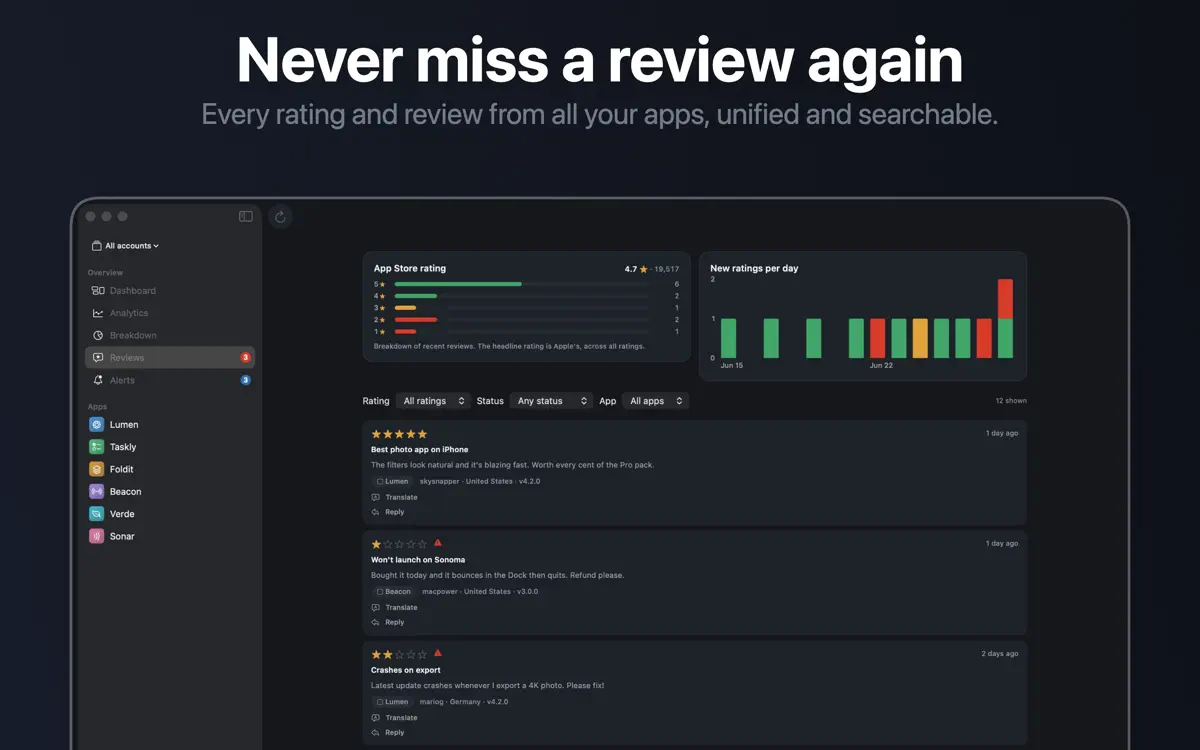
Search every rating and review from all your apps in one place, with a new-ratings-per-day distribution instead of just a running total.
Check live numbers from the menu bar and desktop widgets, use keyboard shortcuts and multiple windows, and export your data to CSV.
Your App Store Connect API key stays in your Mac’s Keychain, and your data connects straight to Apple with no tracking and no servers in between.
Who it’s for
You ship more than one app and want a single dashboard instead of switching between App Store Connect pages for each one.
You manage more than one App Store Connect account and want to aggregate them into one portfolio view.
You want to follow MRR, trials, conversion, churn, and retention across your subscription-based apps in one place.
You want live numbers in the menu bar, desktop widgets, and keyboard shortcuts instead of a browser tab.
How it works
From “Try Appviary as a guest” to “Set alerts and export your data”, in 5 steps.
Explore the portfolio dashboard in “Try as guest” demo mode before connecting any account.
Enter your API key, which Appviary stores in your Mac’s Keychain rather than on a server.
View sales, downloads, proceeds, subscriptions, and reviews for every app you ship, for today, 7 days, 30 days, or any range.
Break subscriptions down by app, country, product, and billing period, and correlate any two metrics across your catalog.
Turn on smart alerts for sales spikes, drops, and 1-2-star reviews, and export any view to CSV.
In depth
Appviary stores your App Store Connect API key in your Mac’s Keychain, not on a server. Your data connects straight from your Mac to App Store Connect, with no tracking involved.
You can also explore the app in “Try as guest” demo mode before connecting any account, so you can see how the portfolio dashboard works first.
Appviary calculates monthly recurring revenue from each plan’s price and billing period, so a single large annual renewal does not distort the number. Churn is measured over the period your data actually covers, and active subscriptions include people on promotional offers, offer codes, and win-back offers.
Period-over-period comparisons are hidden whenever there is no earlier data to compare against, instead of showing a misleading jump.
Appviary stacks every app you ship side by side, so you can view proceeds, downloads, and units across your whole catalog at a glance. You can look at today, the last 7 days, the last 30 days, any custom range, or the “Last year” and “All time” views.
If you manage more than one App Store Connect account, Appviary can aggregate several accounts into a single portfolio view.
Release notes
Version
1.3
New in 1.3
Thanks for using Appviary — your feedback keeps it getting better!
FAQ
Something else? The Appviary support page covers purchases, sync and settings, and lets you write to us directly.
Yes. Appviary is free to download from the App Store. Optional in-app purchases unlock extra features; they are billed by Apple to your Apple Account, and you can manage them at any time in your account settings.
Appviary works on Mac with macOS 14.0 or later.
Appviary shows sales, downloads, proceeds, subscriptions, and reviews for every app in your App Store Connect account, all in one dashboard.
Yes. Appviary can aggregate several App Store Connect accounts into a single portfolio view.
Yes. The “Try as guest” demo mode lets you explore the dashboard before you connect any App Store Connect account.
You can view today, the last 7 days, the last 30 days, any custom range, or the longer “Last year” and “All time” views.
Yes. Appviary supports multiple currencies with automatic conversion.
Yes. Appviary lets you export your data to CSV.
Appviary is available in 44 languages: Arabic, Bangla, Catalan, Chinese (Simplified), Chinese (Traditional), Croatian, Czech, Danish, Dutch, English, Finnish, French, German, Greek, Gujarati, Hebrew, Hindi, Hungarian, Indonesian, Italian, Japanese, Kannada, Korean, Malay, Malayalam, Marathi, Norwegian Bokmål, Odia, Polish, Portuguese, Punjabi, Romanian, Russian, Slovak, Slovenian, Spanish, Swedish, Tamil, Telugu, Thai, Turkish, Ukrainian, Urdu and Vietnamese.
Visit the Appviary support page: it answers common questions about purchases, sync and settings, and has a contact form. You can also write to contact@develak.com. We read every message and reply personally.
Made by Develak
We design and build native iPhone, iPad and Mac apps for founders and companies, with the same care we put into our own. Tell us about your idea.