---
title: "Case Study: Xlocalize, AI Translation for Xcode .xcstrings"
description: "Xlocalize case study: a Mac app that translates Xcode String Catalogs with OpenAI, Claude or Gemini, keeps plurals intact and sends no data to Develak."
url: https://develak.com/blog/case-study-xlocalize/
language: en
updated: 2026-10-03
source: Develak
translations:
fr: https://develak.com/fr/blog/etude-de-cas-xlocalize.md
---
Canonical page:
[Guides](https://develak.com/blog/) 9 min read
# Case study: Xlocalize, a Mac app that translates Xcode String Catalogs with AI
How Xlocalize, Develak’s Mac app for .xcstrings files, approaches AI localization: Xcode’s native format preserved losslessly, per-key context, your own OpenAI, Claude or Gemini key in the Keychain, validation hints and honest error reporting. Only public facts from the Mac App Store.
Develak studio
Published October 3, 2026
[Lire en français](https://develak.com/fr/blog/etude-de-cas-xlocalize/)
Xlocalize is Develak’s Mac app for translating Xcode String Catalogs (`.xcstrings` files) with AI. It opens the catalog in a native editor, sends the strings you choose, with per-key comments as context, to OpenAI, Anthropic Claude or Google Gemini using your own API key, and writes the translations back without breaking plurals, device variations or substitutions. First released on the Mac App Store on June 11, 2025, it reached version 1.5.1 on August 15, 2026, requires macOS 14 or later, and its interface is available in 33 languages. This case study uses only public facts from the listing and the app’s pages.
## Key takeaways
- Xlocalize solves a developer’s problem: translating a String Catalog into many languages without leaving Xcode’s native format or flattening its structure.
- Its key product decision is to respect the file: plurals, device variations and substitutions are preserved losslessly, and the catalog is edited in place.
- The AI is yours: bring your own key for OpenAI, Claude or Gemini, stored in the macOS Keychain, with no account and nothing sent to Develak.
- Quality is built into the workflow: per-key comments as context, statuses, validation hints for placeholders and missing translations, full undo and redo.
- The public version history shows six releases, from new AI providers to making failures visible instead of silent.
## How we wrote this case study
Xlocalize is one of the more than 30 apps Develak publishes, and the only developer tool among our three case studies. As with the others, we stick to what you can verify: the Mac App Store listing and its version history, the [Xlocalize page](https://develak.com/apps/xlocalize/) on this site and its privacy page. No download figures, no revenue, no internal timeline.
## The problem: many languages, one fragile file
Since Xcode 15, [String Catalogs](https://developer.apple.com/documentation/xcode/localizing-and-varying-text-with-a-string-catalog) keep all of an app’s localizable text in one `.xcstrings` file, including plural variants and text that varies by device. That is a big improvement over scattered `.strings` files, but it creates a new risk: any tool that treats the catalog as a flat list of sentences can break the structure that makes it useful. A plural rule turned into a single string, or a `%lld` placeholder lost in translation, becomes a bug that only appears in one language on one screen.
The app’s page names four audiences: iOS, macOS, watchOS and visionOS developers working with `.xcstrings` catalogs; solo developers without a localization team; teams that need to keep dozens of locales in sync; and developers who already store their strings in String Catalogs and do not want a separate export step. Develak is in that list too: localizing our own catalogue of apps, whose listings run from 33 to 44 languages, is what led us to build a dedicated tool, as our [guide to localizing an iOS app with String Catalogs](https://develak.com/blog/localize-ios-app-xcstrings/) explains.
## Product decisions you can see in the app
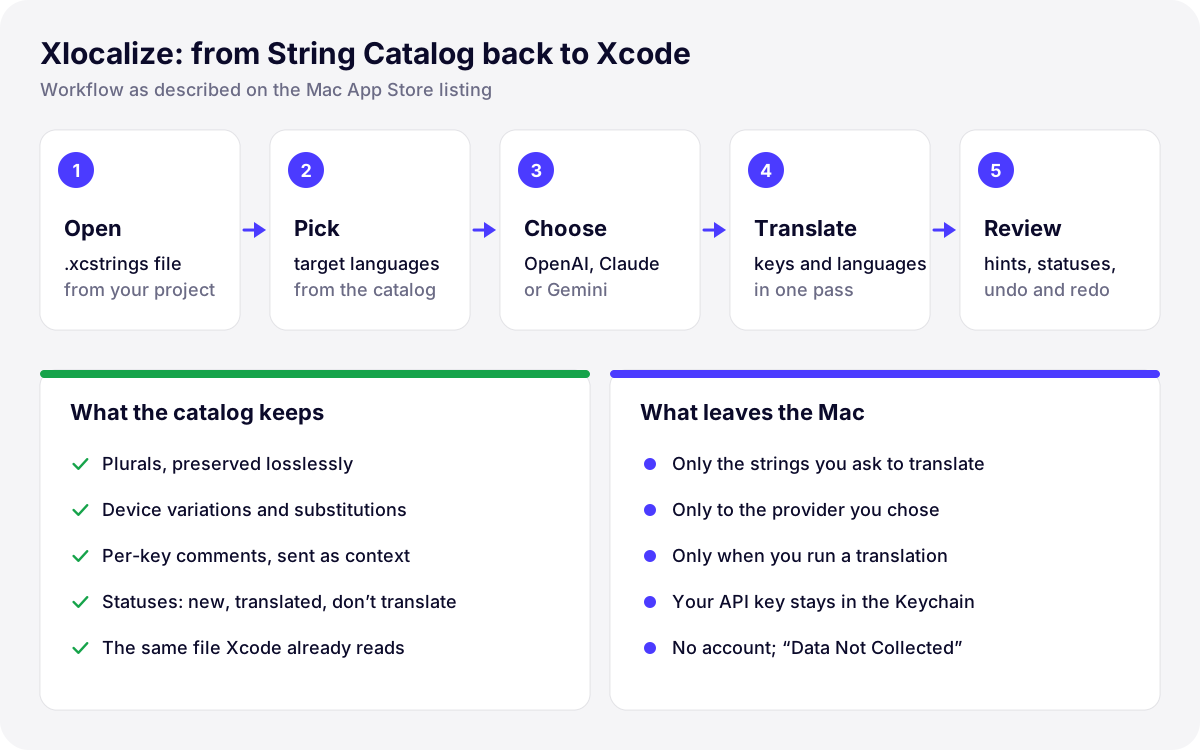
*Illustration: the Xlocalize workflow and its data boundaries, as described on the Mac App Store listing and the app’s privacy page.*
### Stay in Xcode’s native format
Xlocalize opens the `.xcstrings` file from your project and edits it in place. The listing promises a “native .xcstrings editor” in which plurals, device variations and substitutions are preserved losslessly. There is no export to a spreadsheet and no re-import: the file that comes out is the file Xcode already reads. For a developer tool, this is the decision that earns trust, because the cost of a corrupted catalog is far higher than the time saved translating it.
### Context in, better translations out
“Open” can be a verb or an adjective; “Archive” a noun or an action. Xlocalize sends the comment attached to each key as context with the string, so the model knows what it is translating. It is a simple choice that rewards good habits in the codebase: the more precise your translator comments, the better the first pass.
### Bring your own AI
Instead of reselling a model, Xlocalize lets you choose OpenAI (the listing mentions GPT-5 and GPT-4o), Anthropic Claude or Google Gemini, detects the models available to your API key, and stores that key in the macOS Keychain. No account is required. The privacy page spells out the data boundary: the strings you ask to translate go directly from your Mac to the provider you chose, only when you run a translation, and Develak never receives your strings or your key. The App Privacy label reads “Data Not Collected”.
### Bulk work, with a safety net
The listing describes translating hundreds of keys across many languages in one pass, with smart rate limiting to stay within the provider’s limits. Around that speed sits a set of guardrails:
- **Statuses**: each key is new, translated or marked “don’t translate”, which suits brand names and technical terms.
- **Validation hints**: placeholder mismatches, untranslated copies and missing translations are flagged before you ship.
- **Full undo and redo** for every edit, including batch operations.
- **Everyday tools**: copy translations between languages, filter, search and sort.
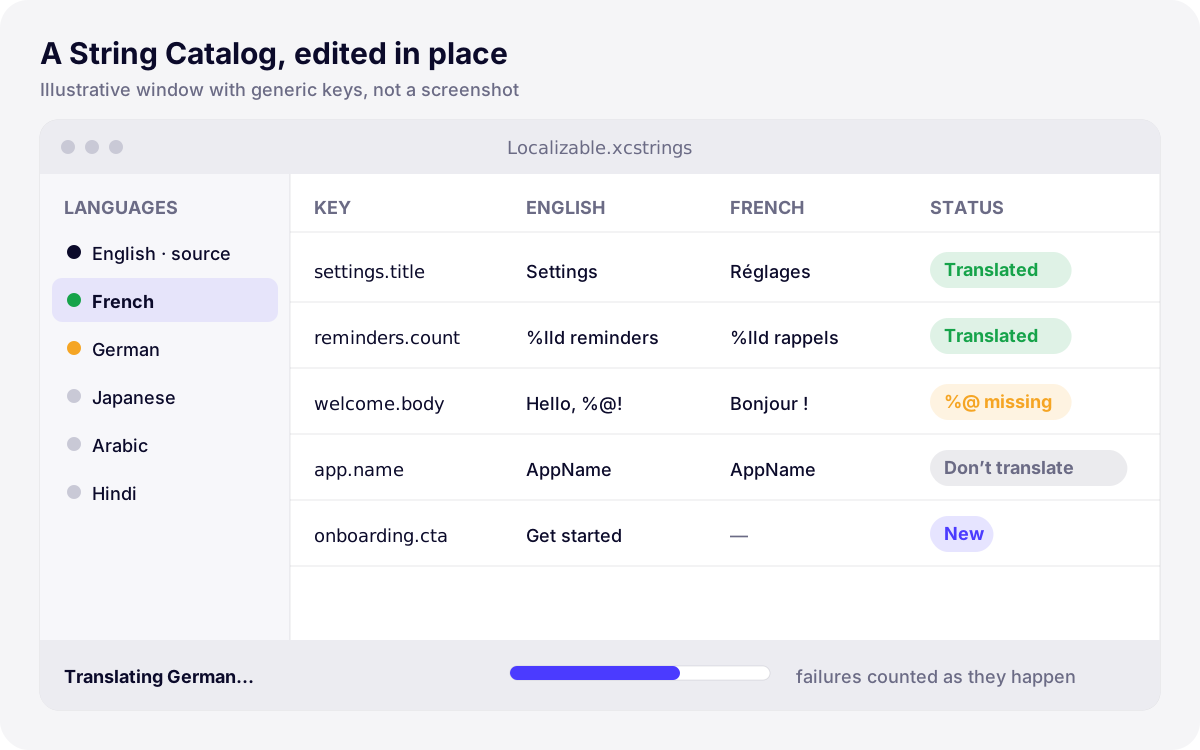
*Illustration: a stylized String Catalog editor with generic keys, showing statuses and a placeholder hint as described in the listing. Not a screenshot of the app.*
### Failures you can see
AI translation depends on an external service, so things fail: no credit left on the account, a model the key cannot use, a network problem, a rate limit. Version 1.5.1 is entirely about making those failures visible. Xlocalize now says exactly why a translation could not be completed, the progress bar counts failures as they happen “so a run that isn’t working no longer looks like one that is”, the API key is verified with a real translation request before a large batch, cancelling keeps the translations already done, and slower reasoning models get longer timeouts and automatic retries.
## Platform and Apple technologies
| Element | What the public sources say |
| --- | --- |
| Platform | Mac app on the Mac App Store, macOS 14.0 or later, 1.9 MB |
| File format | Xcode String Catalogs (`.xcstrings`), edited in place |
| Secrets | API keys stored in the macOS Keychain and never shared |
| Business model | Free download; Premium is an auto-renewable subscription, monthly or yearly, billed through the App Store |
| Privacy | No account; App Privacy label “Data Not Collected”; strings sent only to the provider you choose |
| Interface languages | 33; the listing pitches localizing your own app into 40+ languages |
*Xlocalize at a glance, from the Mac App Store listing and the app’s pages*
Why a native Mac app rather than a web service? The answer is visible in the table. The catalog lives in your project folder, so a Mac app can open and save it where it is, next to Xcode, without uploading the file anywhere. Secrets belong in the Keychain, which macOS already provides. And distribution, billing and subscription management go through the Mac App Store, so there is no account system or license server to run. Each of these choices removes a moving part, and with it a privacy question that the user would otherwise have to ask.
## What the version history shows
| Version | Date | Headline from the release notes |
| --- | --- | --- |
| 1.1 | Jun 11, 2025 | First version on the Mac App Store |
| 1.2 | Jul 11, 2025 | Bug fixes and performance improvements |
| 1.3 | Aug 7, 2025 | Bug fixes and performance improvements |
| 1.4 | Aug 7, 2025 | GPT-5 added to the available models |
| 1.5 | Jun 8, 2026 | Claude and Gemini alongside OpenAI; models detected from the key; more reliable catalog editing; faster bulk translation with undo and redo |
| 1.5.1 | Aug 15, 2026 | Visible translation errors; failures counted live; key verified before a batch; real cancel; retries for slow models and rate limits |
*Xlocalize’s public version history on the Mac App Store (dates as displayed in the listing)*
The history follows the AI market itself. Version 1.4 added GPT-5 to the model list. Version 1.5 opened the app to Claude and Gemini and began detecting the models each key can use. Version 1.5.1 turned to robustness, the less glamorous work that decides whether a developer trusts a tool with a 40-language batch.
## Results, in public facts only
- **Longevity**: on the Mac App Store since June 11, 2025, with six versions up to 1.5.1 on August 15, 2026.
- **Providers**: three AI providers supported as of version 1.5, up from OpenAI alone.
- **Languages**: interface in 33 languages; target languages pitched as 40+.
- **Privacy**: “Data Not Collected”, no account, keys in the Keychain.
- **Ratings**: none displayed yet on the US and French storefronts as of October 3, 2026. We would rather say so than quote a number we do not have.
## What this means for your project
You do not need Xlocalize to benefit from what building it taught us. If you plan to launch in several languages, these are the practices we apply on every localization project:
- **Use String Catalogs from day one**, so plurals and device variants live in one structured file instead of being patched later.
- **Write translator comments** on every ambiguous key: they are the cheapest quality improvement for human and AI translation alike.
- **Treat AI as the first pass**, then have native speakers review onboarding, paywall, permission prompts and App Store metadata.
- **Validate placeholders and missing translations** before every release, and test right-to-left languages on device.
- **Localize the listing, not just the app**: name, subtitle, keywords and screenshots per market.
Our [app localization service](https://develak.com/services/app-localization/) covers the whole chain: preparing the code, translating with context, native review, right-to-left testing and localized App Store listings. If you want to do it yourself, start with our [String Catalog localization guide](https://develak.com/blog/localize-ios-app-xcstrings/) and try [Xlocalize](https://develak.com/apps/xlocalize/) on your own catalog.
## More case studies
- [Pillio](https://develak.com/blog/case-study-pillio/): a medication reminder app in 33 languages, with Apple Health and iCloud sync.
- [ApexLap](https://develak.com/blog/case-study-apexlap/): a lap timer launched in 44 languages, including right-to-left and Indic scripts.
## FAQ
### What is Xlocalize?
Xlocalize is a Mac app published by Develak that translates Xcode String Catalogs (`.xcstrings`) with OpenAI, Anthropic Claude or Google Gemini, using your own API key, while preserving plurals, device variations and substitutions. It is free to download, with an optional Premium subscription.
### Does Develak see my strings or my API key?
No. According to the privacy page, strings go directly from your Mac to the AI provider you chose, only when you run a translation, and the key stays in the macOS Keychain. The provider processes the request under its own terms and bills you directly.
### Will AI translation break my plurals or placeholders?
It can, with tools that flatten the catalog. Xlocalize is built around the String Catalog structure, preserves plurals, device variations and substitutions, and flags placeholder mismatches and missing translations so you can fix them before shipping.
### Is AI translation enough to launch in a new market?
As a first pass, yes; as the final word on the screens that sell and explain your app, no. We recommend native review of onboarding, paywall, permission prompts and App Store metadata, which is what our localization service includes.
### Does Xlocalize only work for iPhone apps?
No. It works on any Xcode String Catalog, and the listing describes it as built for iOS, macOS, watchOS and visionOS developers. Xlocalize itself runs on the Mac, with macOS 14 or later, and its interface is available in 33 languages.
### Can Develak localize my app for me?
Yes. Our [localization service](https://develak.com/services/app-localization/) prepares your code for String Catalogs, translates with context, organizes native review, tests right-to-left layouts and localizes your App Store listing in each language.
Written by
## The Develak studio
Develak is an independent iOS app studio. We have published 34 apps on the App Store since 2025, in up to 44 languages, and we write these guides from that hands-on experience.
[See our 34 apps](https://develak.com/apps/) [About the studio](https://develak.com/about/)
## More iOS guides
[All guides](https://develak.com/blog/)
Guides 11 min read
### [TestFlight guide (2026): internal and external testers, Beta App Review and public links](https://develak.com/blog/testflight-guide/)
How TestFlight works in 2026: internal vs external testers, groups, public links and tester criteria, Beta App Review, uploading and processing builds, export compliance, feedback and crashes, and fixes for Missing Compliance, stuck processing and expired builds.
October 3, 2026
Guides 13 min read
### [iOS privacy manifest (PrivacyInfo.xcprivacy) in 2026: required reason APIs, SDKs and ITMS-91053](https://develak.com/blog/ios-privacy-manifest/)
A practical 2026 guide to the iOS privacy manifest: the four PrivacyInfo.xcprivacy keys, every required reason API code, third-party SDK manifests and signatures, the Xcode privacy report, and how to fix ITMS-91053 and the other upload emails.
October 3, 2026
Guides 10 min read
### [Case study: Pillio, a medication reminder app built natively for iPhone](https://develak.com/blog/case-study-pillio/)
How Pillio, Develak’s medication reminder and dose log for iPhone and iPad, was shaped: flexible schedules, Apple Health and iCloud sync, Critical Alerts, accessibility, privacy without an account, and ten releases in public. Only verifiable facts from the App Store listing.
October 3, 2026
## Turn this guide into a shipped app
Develak designs, builds and publishes native iOS apps for founders and teams worldwide, in English or French.
[Start a project](https://develak.com/contact/) [contact@develak.com](mailto:contact@develak.com)
---
*Markdown version of for AI assistants, published by Develak. Links lead to the web pages; add .md to a page URL for its Markdown version. Site index: .*