---
title: "App Store Subscription Review 2026: Pass Guideline 3.1.2"
description: "Subscription rejected by App Review? Guideline 3.1.2 explained: paywall disclosures, EULA and privacy links, Restore Purchases, setup and testing."
url: https://develak.com/blog/app-store-subscription-review/
language: en
updated: 2026-10-03
source: Develak
translations:
fr: https://develak.com/fr/blog/abonnements-app-store-validation.md
---
Canonical page:
[Guides](https://develak.com/blog/) 13 min read
# App Store subscriptions in 2026: how to pass App Review (guideline 3.1.2, paywall, rejections)
How to get auto-renewable subscriptions approved by App Review in 2026: guidelines 3.1.1 and 3.1.2, required paywall disclosures, Terms of Use and privacy links, Restore Purchases, App Store Connect setup, offers, StoreKit testing and the rejections to avoid.
Develak studio
Published October 3, 2026
[Lire en français](https://develak.com/fr/blog/abonnements-app-store-validation/)
To get an auto-renewable subscription approved on the App Store in 2026, your paywall must show the subscription name, its length, the full price that will be billed, what it includes and any free-trial terms; the app must link to your Terms of Use (EULA) and privacy policy and offer Restore Purchases; your App Store metadata must link to the same Terms and privacy policy; and the first subscription must be submitted in the same submission as an app version. Almost every subscription rejection is either guideline 3.1.2 (missing information) or 2.1 (the reviewer could not find or load your in-app purchases).
## Key takeaways
- Digital features must be sold with in-app purchase (3.1.1), and subscriptions must last at least seven days, provide ongoing value and work on all of the user’s devices (3.1.2(a)).
- The paywall shows name, length, full billed price (the most prominent price), what’s included and trial terms, plus Terms of Use, privacy policy and Restore Purchases.
- Terms of Use and privacy links are required in two places: inside the app and in the App Store metadata.
- The first auto-renewable subscription, with its group, goes in the same draft submission as an app version, with a review screenshot and review notes.
- App Review buys in the sandbox: test with StoreKit in Xcode, then the sandbox and TestFlight, and make sure your server accepts sandbox transactions.
## The rules that apply to subscriptions
Four texts decide whether a subscription passes. Read them in the original: the [App Review Guidelines](https://developer.apple.com/app-store/review/guidelines/#in-app-purchase) and Apple’s [auto-renewable subscriptions guide](https://developer.apple.com/app-store/subscriptions/) are short and specific.
| Rule | What it requires |
| --- | --- |
| 3.1.1 In-App Purchase | Unlocking features or content uses in-app purchase, not license keys or QR codes. You should have a restore mechanism for restorable purchases. |
| 3.1.2(a) Permissible uses | Ongoing value, a period of at least seven days, available across all of the user’s devices; no bait-and-switch; don’t take away features existing users already paid for. |
| 3.1.2(b) Upgrades and downgrades | A seamless upgrade/downgrade path, and no way to subscribe by accident to several variations of the same thing. |
| 3.1.2(c) Subscription information | Before asking someone to subscribe, describe clearly what they get for the price, and meet the disclosure requirements of Schedule 2 of the Apple Developer Program License Agreement. |
| Schedule 2, section 3.8(b) | Disclose the subscription title, its length, its price (and price per unit if appropriate), with links to your privacy policy and Terms of Use accessible within the app. |
| 2.1(b) App Completeness | In-app purchases must be complete, visible to the reviewer and functional; if one can’t be found, explain why in the review notes. |
*Guidelines and agreement clauses App Review applies to auto-renewable subscriptions*
Durations are fixed by App Store Connect: one week, one month, two months, three months, six months or one year. Auto-renewable subscriptions may offer a free trial, configured in App Store Connect as an introductory offer so that the App Store handles eligibility and billing.
## What the paywall must show
Apple’s subscription guidance lists what a sign-up screen needs, and reviewers check it screen by screen. Before the purchase button, show:
1. **The subscription name and what it includes**: features, content, storage, “how many issues per month”, in the words of 3.1.2(c).
2. **The length of each plan and its full renewal price**, localized. The amount that will actually be billed must be the most prominent price: for a yearly plan, the yearly price. A “$2.50 per month” breakdown can appear, but smaller and subordinate.
3. **The free-trial terms**: how long the trial lasts and the price billed once it ends.
4. **The renewal behaviour** in plain words: the plan renews automatically until cancelled.
5. **Working links** to your Terms of Use (EULA) and privacy policy.
6. **A way for current subscribers to restore purchases** or sign in.
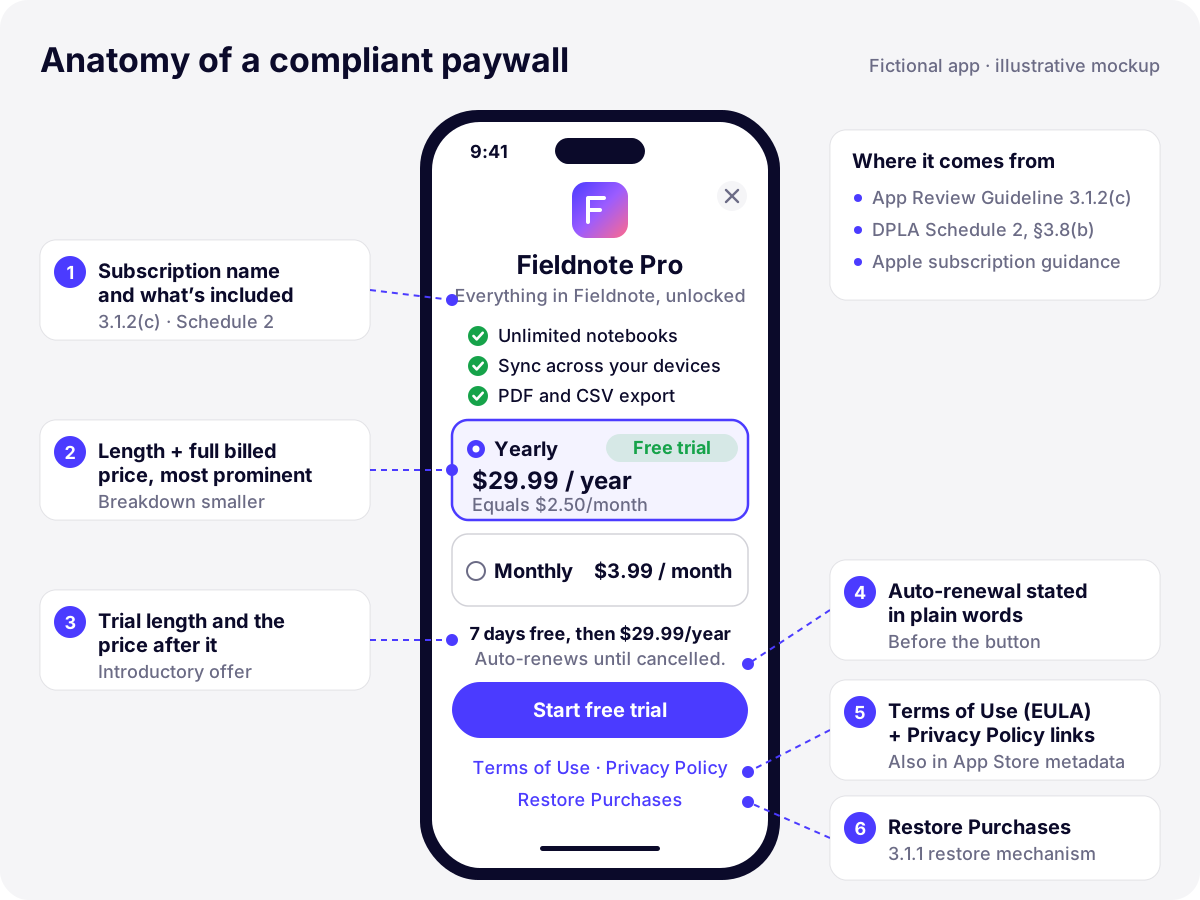
*Illustration: the six elements App Review looks for on a subscription paywall (fictional app, illustrative prices).*
Patterns that get paywalls rejected: a close button that appears after a delay, a pre-selected trial whose post-trial price is hidden in grey small print, a price shown per week when the plan bills yearly, or a “Continue” button that starts a purchase without saying so. Guideline 3.1.2(a) is explicit that apps that trick users into subscribing are removed, and the developer can be removed from the program.
## Terms of Use and privacy links: in the app and in the metadata
This is the single most common 3.1.2 rejection. The message lists two blocks of missing items: what must be included *within the app* (a functional link to the Terms of Use and one to the privacy policy) and what must be included *in the App Store metadata* (the same two links). Having them on the paywall is not enough.
- **Privacy policy in the metadata:** the Privacy Policy URL field in App Store Connect, which every iOS app needs anyway.
- **Terms of Use in the metadata, if you use Apple’s standard EULA:** Apple’s standard license applies by default, but reviewers still expect a link to it in the app description. Add [Apple’s standard EULA URL](https://www.apple.com/legal/internet-services/itunes/dev/stdeula/) at the end of the description.
- **Terms of Use, if you have your own:** enter it as a custom License Agreement in App Store Connect (App Information), and link the same terms from the paywall.
We close the description of every subscription app with a short block like this one. Avoid hard-coding prices there: they vary by storefront, and the paywall already shows them localized.
```
Fieldnote Pro is an optional auto-renewable subscription (monthly or yearly).
New subscribers to the yearly plan get a 7-day free trial.
Payment is charged to your Apple Account. The subscription renews automatically
unless it is cancelled at least 24 hours before the end of the current period.
Manage or cancel it at any time in your Apple Account settings.
Terms of Use: https://www.apple.com/legal/internet-services/itunes/dev/stdeula/
Privacy Policy: https://example.com/privacy
```
The privacy policy itself must match your App Privacy answers and your privacy manifest. If a subscription SDK or analytics tool is involved, see our [iOS privacy manifest guide](https://develak.com/blog/ios-privacy-manifest/) before you declare “Data Not Collected”.
## Setting up the subscription in App Store Connect
Nothing loads, even in the sandbox, until the Account Holder has signed the Paid Applications Agreement with tax and banking information. Then, under Monetization › Subscriptions:
1. **Create a subscription group** with a reference name, then add a localized group display name.
2. **Add each subscription**: reference name (up to 64 characters, internal), product ID (letters, numbers, hyphens, periods and underscores, up to 100 characters, never reusable even after deletion), duration, price and availability.
3. **Localize it**: a display name of 2 to 30 characters and a description of up to 45 characters, in every language the app supports.
4. **Fill in Review Information**: an App Review screenshot that clearly shows what is being sold (your paywall, in a size your app supports; it is never shown on the App Store) and review notes of up to 4,000 characters.
5. **Optionally** add a 1024 × 1024 promotional image (needed to promote the subscription on your product page or to use win-back offers), and set up offers.
6. **Submit it with the binary.** The first auto-renewable subscription must be submitted with a new app version, and a new subscription goes with its group. Add the version, the group and every subscription to the same draft submission before clicking Submit for Review. Once the first one is approved, later subscriptions can be submitted without a new version.
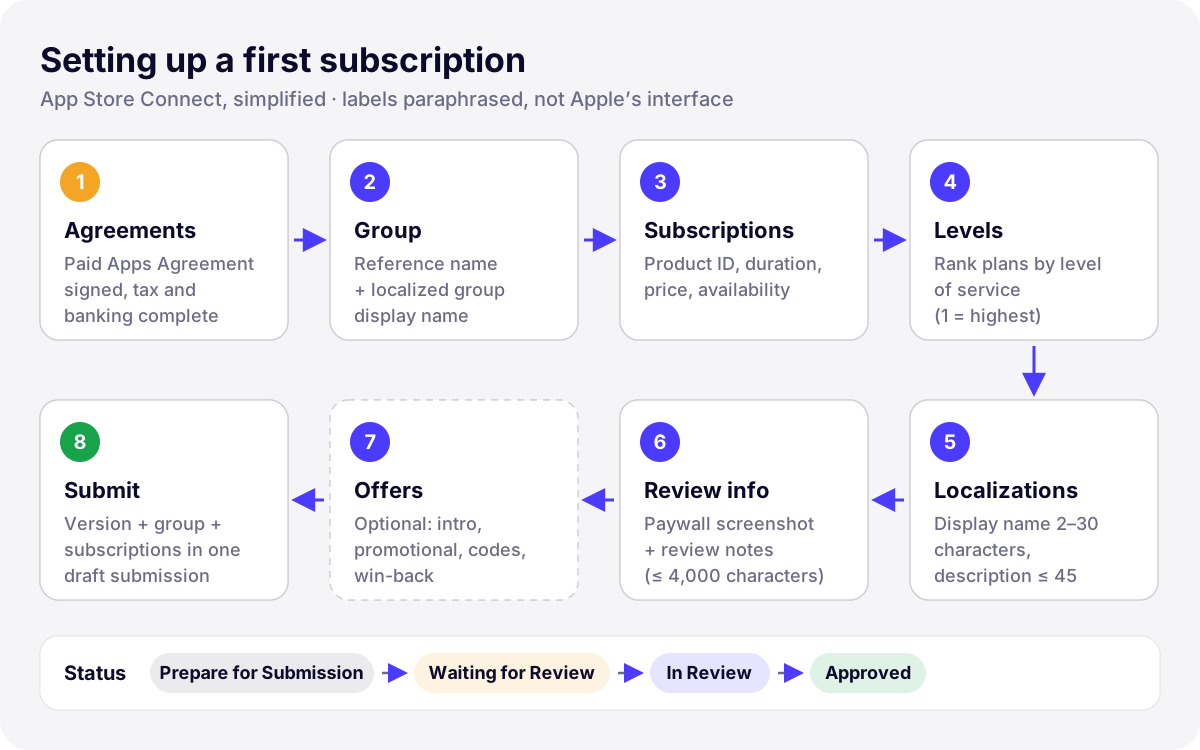
*Illustration: the App Store Connect setup sequence for a first subscription (simplified, labels paraphrased).*
### Subscription groups and levels
A customer can hold only one subscription per group at a time, which is how 3.1.2(b) is enforced: put your monthly and yearly plans of the same service in one group, and most apps need a single group. Rank the plans by level of service (level 1 is the highest). An upgrade takes effect immediately with a prorated refund; a downgrade takes effect at the next renewal; a crossgrade between plans of the same level starts immediately if the durations match, otherwise at the next renewal. Two groups for the same features is how users end up paying twice, and reviewers flag it.
New in 2026: since April 27, 2026, a one-year subscription can also offer a monthly billing plan with a 12-month commitment, for customers on iOS 26.4 or later, everywhere except the United States and Singapore. If you add one, the paywall must make the commitment as clear as the monthly amount.
## Introductory offers, promotional offers and offer codes
| Offer | Who gets it | Key rules |
| --- | --- | --- |
| Introductory offer | New subscribers | Free trial, pay as you go or pay up front; one introductory offer per customer per subscription group |
| Promotional offer | Existing or former subscribers | Your own eligibility logic; up to 10 offers per subscription |
| Offer code | Anyone with a code | One-time-use or custom codes, redeemed in the App Store, by URL or in the app; since October 2025 available for all in-app purchase types |
| Win-back offer | Lapsed subscribers | Can appear on the product page, in subscription settings and in the app; needs an approved promotional image |
*Subscription offer types in App Store Connect*
For App Review, the important part is the disclosure. If your paywall says “7 days free”, check eligibility first with `product.subscription?.isEligibleForIntroOffer`: a returning user who already used the trial will be charged immediately, and a paywall that promised a free trial to them is misleading. Show the post-offer price next to every offer.
## Building the paywall with StoreKit 2
The fastest compliant route is `SubscriptionStoreView` (iOS 17 and later). It displays localized names, descriptions and prices from App Store Connect, and shows Terms of Service and Privacy Policy buttons automatically; you can point them to your own pages:
```swift
SubscriptionStoreView(groupID: "YOUR_GROUP_ID") {
PaywallHeader() // name + what's included
}
.storeButton(.visible, for: .restorePurchases)
.subscriptionStorePolicyDestination(url: termsURL, for: .termsOfService)
.subscriptionStorePolicyDestination(url: privacyURL, for: .privacyPolicy)
```
With a custom paywall, the logic stays small. Load products, read entitlements from `Transaction.currentEntitlements`, listen to `Transaction.updates` from app launch, and call `AppStore.sync()` only from an explicit Restore tap (it asks the user to authenticate):
```swift
import StoreKit
@MainActor
final class Store: ObservableObject {
@Published var products: [Product] = []
@Published var isPro = false
@Published var loadFailed = false
func load() async {
do {
products = try await Product.products(for: ["com.example.pro.yearly",
"com.example.pro.monthly"])
loadFailed = products.isEmpty
} catch {
loadFailed = true // show a retry button, never an empty paywall
}
await refreshEntitlements()
}
func refreshEntitlements() async {
var active = false
for await result in Transaction.currentEntitlements {
if case .verified(let transaction) = result,
transaction.revocationDate == nil {
active = true
}
}
isPro = active
}
func restore() async {
try? await AppStore.sync() // only from a user tap
await refreshEntitlements()
}
}
```
Two details matter for review. An empty product list must produce a visible error with a retry, not a blank screen the reviewer reports as “in-app purchases not found”. And offer `showManageSubscriptions(in:)` in your settings screen so subscribers can cancel or change plans without leaving the app.
## Testing: Xcode, sandbox, TestFlight and the review environment
- **StoreKit Testing in Xcode.** A `.storekit` configuration file, local or synced from App Store Connect (Xcode 14 and later), lets you test purchases, trials, renewals, refunds and failures in Simulator, offline, before anything exists in App Store Connect. See [Setting up StoreKit Testing in Xcode](https://developer.apple.com/documentation/xcode/setting-up-storekit-testing-in-xcode).
- **Sandbox.** Create Sandbox Apple Accounts in App Store Connect and sign in under Settings › Developer on the device. From the sandbox settings you can change the renewal rate, clear purchase history (which makes the account eligible for introductory offers again) and test interrupted purchases. Metadata changes can take up to an hour to reach the sandbox.
- **TestFlight.** TestFlight builds always use the sandbox for in-app purchases, so testers are never charged. Our [TestFlight guide](https://develak.com/blog/testflight-guide/) covers groups, beta review and build expiry.
- **App Review.** The reviewed build is production-signed and talks to your production servers, but purchases go through the App Store’s test environment. If your server validates transactions, it must accept sandbox ones: with the App Store Server API, check the transaction’s environment and query the sandbox endpoint for sandbox transactions.
## Common subscription rejections and their fixes
| Rejection | Usual cause | Fix |
| --- | --- | --- |
| 3.1.2: missing subscription information | No Terms of Use or privacy link in the app or in the description; price or length missing on the paywall | Add both links in both places; show name, length, billed price and trial terms |
| 2.1: in-app purchases not found | Subscription not added to the submission; paywall only reachable deep in onboarding | Submit the subscription with the version; explain in review notes how to reach the paywall |
| 2.1: products don’t load or purchase fails | Paid Applications Agreement inactive, product ID typo, product not available in the reviewer’s storefront, server rejecting sandbox transactions | Check agreements and IDs, make products available wherever the app is, accept sandbox transactions |
| 3.1.1: no restore mechanism | No Restore Purchases button or sign-in for existing subscribers | Add a visible Restore Purchases control |
| 3.1.2(a): misleading or unfair subscription | Hidden trial price, per-week price on a yearly plan, paid features removed from existing buyers | Make the billed amount the most prominent price; keep what users already paid for |
| 3.1.2(b): duplicate subscriptions | Equivalent plans in separate groups | One group, ranked levels |
*Subscription rejection causes and how to fix them*
For a metadata-only issue, such as the Terms link missing from the description, you don’t need a new build: edit the description and reply in App Store Connect. For anything in the binary, fix, increase the build number and resubmit with a short note of what changed. Our [App Store submission checklist](https://develak.com/blog/app-store-submission-checklist/) covers the rest of the review process.
## A note on external purchase links in the United States
Since May 2025, following a US court order in Epic Games v. Apple, guidelines 3.1.1(a) and 3.1.3 no longer prohibit buttons, external links or other calls to action toward other purchase methods in apps on the United States storefront. Elsewhere, linking out still requires one of Apple’s region-specific entitlements. The litigation is still ongoing in 2026 (Apple has taken it to the US Supreme Court), so the conditions can change. Two practical points: in-app purchase remains required for digital features in every storefront, so your StoreKit subscription and its disclosures still go through review; and an external link is an addition, not a replacement.
## Pre-submission checklist
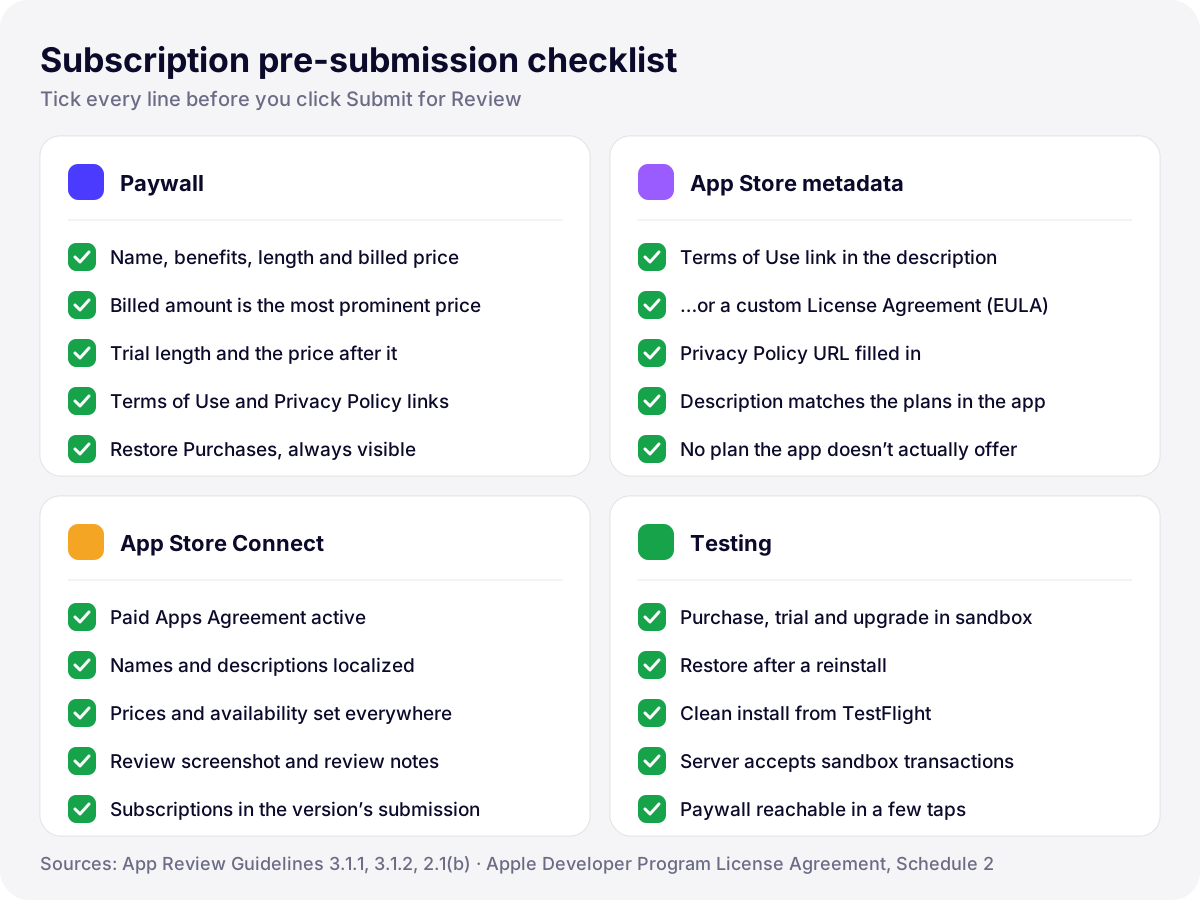
*Illustration: what we verify before submitting an app with auto-renewable subscriptions.*
- **Paywall:** name, benefits, length and full billed price of each plan; trial length and price after it; renewal statement; Terms and privacy links; Restore Purchases.
- **Metadata:** Terms of Use link in the description or a custom EULA; Privacy Policy URL; a description that matches the plans in the app.
- **App Store Connect:** Paid Applications Agreement active; localized names and descriptions; prices and availability; review screenshot and notes; subscriptions in the same submission as the version.
- **Testing:** purchase, trial, upgrade, restore and cancellation in the sandbox; a clean TestFlight install; server accepting sandbox transactions; paywall reachable in a few taps.
## How Develak handles subscription review
Develak publishes more than 30 apps on the App Store, and many are free downloads with optional subscriptions. [Pillio](https://develak.com/apps/pillio/), our pill reminder, is one example: it offers a monthly plan and an annual plan with a 7-day free trial, which is exactly the kind of paywall where trial terms and the billed price have to be unambiguous. In our submissions we check the paywall against the list above, end the description with the Terms and privacy links, attach the paywall as the review screenshot and tell the reviewer in the notes how to reach it.
If you are launching a subscription product, our [MVP app development service](https://develak.com/services/mvp-app-development/) includes StoreKit 2 paywalls, App Store Connect setup and the first review. For live apps, our [app maintenance service](https://develak.com/services/app-maintenance/) keeps paywalls, SDKs and metadata aligned with Apple’s rules as they change. Nobody can guarantee approval, since only Apple decides, but these checks remove the avoidable rejections.
## FAQ
### Why was my subscription rejected under guideline 3.1.2?
Usually because required information is missing: a functional link to the Terms of Use (EULA) or the privacy policy, either inside the app or in the App Store metadata, or the paywall doesn’t clearly show the plan’s length, the full billed price and what it includes. Read the rejection message: it lists exactly which items are missing and where.
### Do I need my own Terms of Use for a subscription app?
No. Apple’s standard EULA applies by default and is accepted. You still need to link to it: from the paywall, and in the app description. If you write your own terms, add them as a custom License Agreement in App Store Connect and link the same document from the app.
### Do I have to submit the subscription with an app version?
For the first auto-renewable subscription, yes: it must be in the same submission as a new app version, together with its subscription group. After a first subscription is approved, you can submit new ones on their own, as long as the app has an approved version.
### Why does App Review say it couldn’t find my in-app purchases?
Either the products weren’t part of the submission, or they didn’t load in the review environment: an inactive Paid Applications Agreement, a product ID mismatch, a product not available in the reviewer’s storefront, or a server that rejects sandbox transactions. If the paywall only appears after onboarding or a specific action, say so in the review notes, as guideline 2.1(b) asks.
### Can I show a per-week or per-month price for a yearly plan?
Yes, as a secondary detail. Apple’s guidance says the amount actually billed must be the most prominent pricing element, so a yearly plan shows its yearly price first and largest, with any breakdown smaller and subordinate.
Written by
## The Develak studio
Develak is an independent iOS app studio. We have published 34 apps on the App Store since 2025, in up to 44 languages, and we write these guides from that hands-on experience.
[See our 34 apps](https://develak.com/apps/) [About the studio](https://develak.com/about/)
## More iOS guides
[All guides](https://develak.com/blog/)
Guides 11 min read
### [TestFlight guide (2026): internal and external testers, Beta App Review and public links](https://develak.com/blog/testflight-guide/)
How TestFlight works in 2026: internal vs external testers, groups, public links and tester criteria, Beta App Review, uploading and processing builds, export compliance, feedback and crashes, and fixes for Missing Compliance, stuck processing and expired builds.
October 3, 2026
Guides 13 min read
### [iOS privacy manifest (PrivacyInfo.xcprivacy) in 2026: required reason APIs, SDKs and ITMS-91053](https://develak.com/blog/ios-privacy-manifest/)
A practical 2026 guide to the iOS privacy manifest: the four PrivacyInfo.xcprivacy keys, every required reason API code, third-party SDK manifests and signatures, the Xcode privacy report, and how to fix ITMS-91053 and the other upload emails.
October 3, 2026
Guides 9 min read
### [Case study: Xlocalize, a Mac app that translates Xcode String Catalogs with AI](https://develak.com/blog/case-study-xlocalize/)
How Xlocalize, Develak’s Mac app for .xcstrings files, approaches AI localization: Xcode’s native format preserved losslessly, per-key context, your own OpenAI, Claude or Gemini key in the Keychain, validation hints and honest error reporting. Only public facts from the Mac App Store.
October 3, 2026
## Turn this guide into a shipped app
Develak designs, builds and publishes native iOS apps for founders and teams worldwide, in English or French.
[Start a project](https://develak.com/contact/) [contact@develak.com](mailto:contact@develak.com)
---
*Markdown version of for AI assistants, published by Develak. Links lead to the web pages; add .md to a page URL for its Markdown version. Site index: .*